I've been tasked (more or less) with building the first Go service at $DAYJOB, which is almost exclusively a Python shop. Why Go of all languages? Well, some of my coworkers are big fans of the gopher, it's an easy language, it's attached to one of the big companies, and it's much faster than Python, so I feel more comfortable pushing for this rather than Rust or (sadly) Nix.
The project that recently fell onto my lap is basically RCE-as-a-service, and it just so happens that one of the few languages that I would feel comfortable letting users execute remotely on our servers has a Go implementation, which is as good an excuse as any to take a break from the usual snekslop.
I still haven't convinced anybody here to get on the Nix train, so after a short stint of building the project and the OCI images with a recursive cycle of Make and Nix, I breathed a heavy sigh and dropped it for Docker and Docker Compose, which is what we generally use here.
Which is a shame, because Nix is pretty good at building OCI images. This is all the code you need to create a minimal image that contains only your service and nothing else, not even /bin/sh.
{ pkgs ? import <nixpkgs> {} }:
pkgs.dockerTools.streamLayeredImage {
  name = "someimage";
  tag = "latest";
  config.Cmd = [
    "${pkgs.hello}/bin/hello"
  ];
}
You can build that with nix-build docker-test.nix and inside ./result you'll find a script that generates the image's tarball. Load it up with ./result | docker load and Docker will report a new image called someimage:latest when you run docker image ls. It's only 45.8MB, and most of that is taken up by glibc.
But what if I told you that you can get more or less the same result with a simple Dockerfile if you know what you're doing? Especially if you're building a static executable, which Go famously does (at least when you set CGO_ENABLED=0) and if you're willing to sacrifice a few affordances. Who needs coreutils anyway?
In this post I'll show you a few tricks I found while striving to make small and fast-building images. I'm not an expert in Docker by any stretch so maybe you know all of this stuff already, but perhaps you might learn something new.
A barebones image
I'm using goose for database migrations. I configured the docker-compose.yml to run its container just after the database has started and before the actual service runs, and since it's a very small self-contained tool I figured I could try to make the image as small and quick to build as possible. Let me show you the relevant part of the docker-compose.yml first:
services:
  migrate:
    image: migrate:latest
    pull_policy: build
    build:
      context: https://github.com/pressly/goose.git#v3.26.0
      dockerfile: $PWD/Dockerfile.migrate
    environment:
      GOOSE_DBSTRING: postgresql://AzureDiamond:hunter2@db:5432/bobby
      GOOSE_MIGRATION_DIR: /migrations
      GOOSE_DRIVER: postgres
    depends_on:
      db:
        condition: service_started
    volumes:
      - ./migrations:/migrations
The build.context parameter specifies the "set of files" that are available from the host while building a Docker image. It's the parameter that you pass after docker build, generally . (the PWD). Here I specified a GitHub URL with a tag, so when I'm referring to . in the Dockerfile above I get the root of the goose project on that tag's commit. I didn't know Docker could do that!
The build.dockerfile path includes $PWD because even if Docker itself can refer to Dockerfiles outside of its context, Docker Compose apparently can't unless you specify it as an absolute path. I think this will break if you try to run docker compose from another directory, but it's good enough for now.
Now let's take a look at the Dockerfile itself:
FROM golang:1.25-alpine3.23 AS builder

WORKDIR /build

ARG CGO_ENABLED=0

ARG GOCACHE=/root/.cache/go-build
ARG GOMODCACHE=/root/.cache/go-mod

RUN --mount=type=cache,target=/root/.cache/go-build \
  --mount=type=cache,target=/root/.cache/go-mod \
  --mount=type=bind,source=.,target=/build \
  go build -tags='no_clickhouse no_libsql no_sqlite3 no_mssql no_vertica no_mysql no_ydb' -o /goose ./cmd/goose

FROM scratch

COPY --from=builder /goose /goose

CMD ["/goose", "up"]
A few things to note:
- I used the Alpine image for Go because it's the smallest and it includes everything I need to build the tool.
- I set
CGO_ENABLED=0to ensure that the executable only builds with the Go toolchain and does not link to libc. According to the docs, The cgo tool is enabled by default for native builds on systems where it is expected to work so you have to take extra care to disable it if you don't want or need it. - I set
GOCACHEandGOMODCACHE(docs) to a known location to ensure that I can take advantage of cache mounts on subsequent rebuilds. Admittedly this is not very useful for an external tool that I'm only expecting to build once but hey, every little bit helps. - Instead of
ADDing orCOPYing the package's source I bind mounted it to the workdir. This should make it a bit faster because it avoids an extra copy into the build container. FROM scratchdefines a second build stage that ensures any artifacts from the actual build are discarded.scratchis the null image.
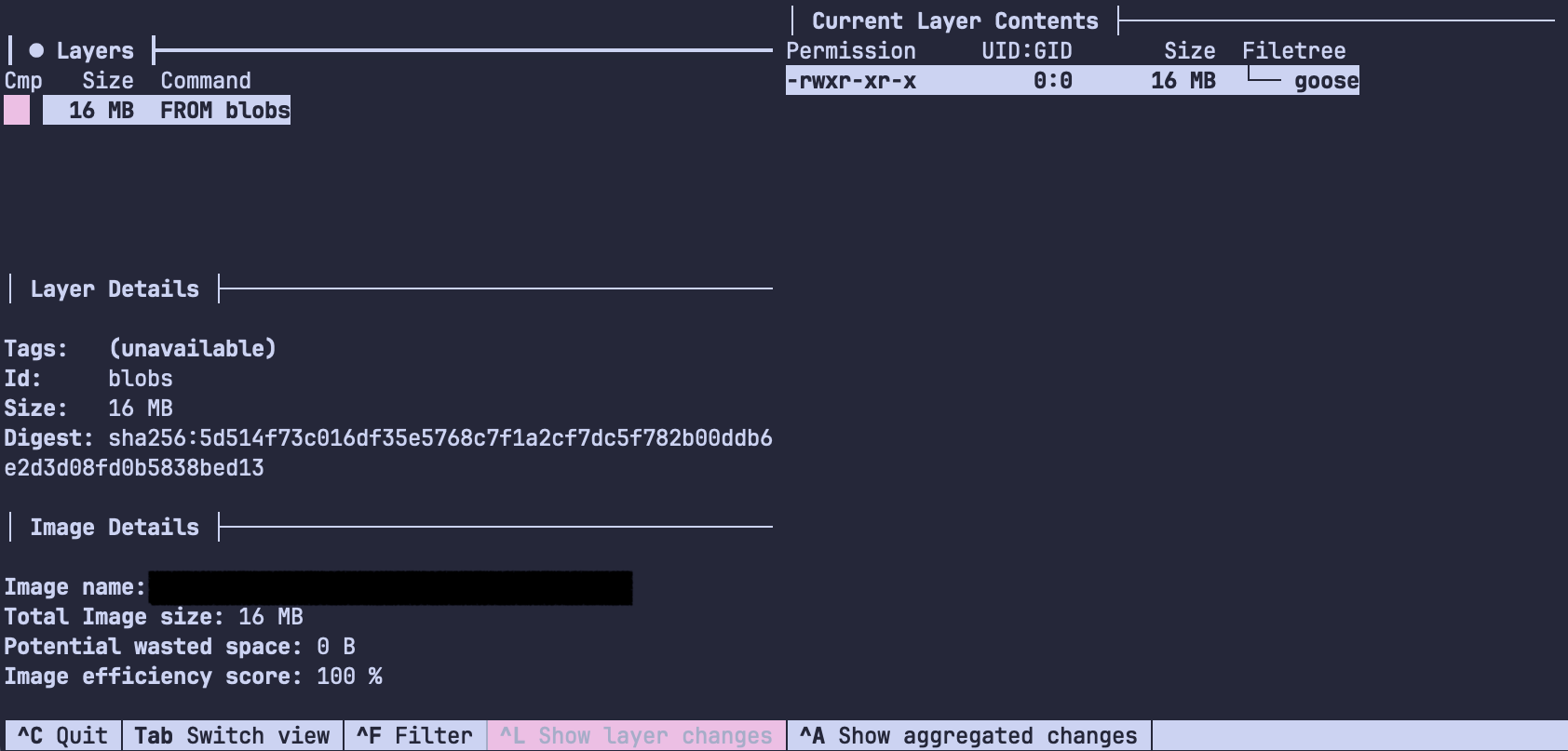
The result is an image with one layer containing one file that builds, loads and boots extremely fast and is only *chef's kiss* 15.9MB in size. Not too bad!
The build context
Earlier I mentioned the build context. Keeping it small is important because Docker copies all files available in the build context to the builder every time you run a docker build, so if you have lots of files in your repo that you don't need to build the image you'll probably want to exclude them. The way you do that is by keeping a .dockerignore file alongside your Dockerfile.
I have to stress one point: the build context includes everything inside the directory you run docker build from unless it's listed in .dockerignore. I thought some obvious things like .git would be excluded by default, but a quick test disproved that:
FROM busybox
WORKDIR /
COPY . ./
CMD []
Try saving that file as Dockerfile.test in one of your repos, build it with docker build -f Dockerfile.text -t build-context ., open a shell with docker run --rm -it build-context /bin/sh and run find. Everything's in there: .git, .jj, the Dockerfile.test itself, and all the rest of the build artifacts and assorted junk you have accumulated in your project directory. Ignoring them won't make your images smaller, but it might make the build quicker.
# .dockerignore
.*

Dockerfile*
docker-compose.yml

# ...
Granular layers
Splitting and ordering layers is probably the most well-known and obvious Docker build time optimization there is, but it doesn't hurt to mention. This is the Dockerfile for the service I'm building:
FROM golang:1.25-alpine3.23 AS builder

WORKDIR /build

ARG CGO_ENABLED=0

ARG GOCACHE=/root/.cache/go-build
ARG GOMODCACHE=/root/.cache/go-mod

RUN --mount=type=cache,target=/root/.cache/go-build \
  --mount=type=cache,target=/root/.cache/go-mod \
  go install github.com/DataDog/orchestrion@latest

RUN --mount=type=bind,source=go.mod,target=go.mod \
  --mount=type=bind,source=go.sum,target=go.sum \
  --mount=type=cache,target=/root/.cache/go-build \
  --mount=type=cache,target=/root/.cache/go-mod \
  go mod download

RUN --mount=type=bind,source=go.mod,target=go.mod \
  --mount=type=bind,source=go.sum,target=go.sum \
  --mount=type=cache,target=/root/.cache/go-build \
  --mount=type=cache,target=/root/.cache/go-mod \
  --mount=type=bind,source=internal,target=internal \
  --mount=type=bind,source=cmd,target=cmd \
  --mount=type=bind,source=orchestrion.tool.go,target=orchestrion.tool.go \
  orchestrion go build -o server ./cmd/server

FROM alpine:3.23 AS prod

WORKDIR /app

COPY --from=builder /build/server .

ENTRYPOINT ["/app/server"]
You can see all the bind and cache mount tricks from earlier, not much has changed. I'm installing orchestrion (a great tool to bloat up your binary size if you ever feel like it) early because that's the least likely to change. After that I bind mount go.mod and go.sum and only download the dependencies, because that's the step that generally takes the most time and dependencies change less often than code. Only at the end do I bind mount the package directories and build the server.
You can iterate on this by changing one of the relevant files and ensuring that all the previous steps are marked as CACHED on the next docker build. Again, this won't save you space but it'll save you a lot of time while iterating.
Conclusions
Summing up:
- Read the Optimize cache usage in builds page in the Docker documentation, and maybe take a look at the rest while you're there.
- Split, merge and order layers according to how often you expect them to be rebuilt. Directives like
ENV,ARGandWORKDIRshould go before everything else. - Use multi-stage builds to shrink the final image size. Consider if you can get away with using
scratch,busyboxoralpinefor the final image. - If your project contains multiple separate applications (for example a backend and a frontend) you can create separate build stages for each of them, and then copy the results into a final image. Stages that don't depend on each other are built in parallel if you're using BuildKit, and you can do all sorts of tricks with multi-stage builds to ensure your CPU runs hot all the time.
- Add a
.dockerignoreto your project, and make sure to put.gitin there if you don't need it. - Try to set up cache mounts to make sure dependencies and intermediate build artifacts are persisted across builds. Some CI services (GitHub actions, apparently) even let you set up external caches.
- Try to use bind mounts instead of
COPYing source files into the builder. Bind mounts are usually read-only, but you can make them read-write if you really need to. - I didn't use it in my
Dockerfiles, but apparently you should be usingADDfor downloading files, archives or Git repos during your build. The docs mention thatCOPYshould mostly be used for copying files between stages or for files you need in your final image, and for the rest you should try to use bind mounts. - Use smaller base images when possible and if you really have to install stuff with
aptyou should make an intermediate image and upload it to your container repository of choice so your poor runners don't have to hammer Debian's mirrors every single time you push.
One last trick before the post is over: I just discovered that Docker Compose has a watch mode that tracks changes in the build context and rebuilds (or does other things with) your image on every change. Nice!