2025-12-15
At the beginning of the year, I tested the Snapdragon X Elite unreleased dev-kit, and I couldn't really compare x86 versus native gaming performance for the same game. I only managed to get World of Warcraft Classic x86 to run, and when compared to the native version, the FPS drop was 40-60% in two simple benchmarks. WoW retail x86 did not work, but now with the latest Windows improvements and the Prism emulation layer, things have changed.
The tests were done on a Snapdragon X Elite dev kit equipped with X1E-00-1DE Snapdragon X Elite SoC (3.8 GHz with 4.3 GHz boost on 1-2 cores) and 32GB of RAM. The dev kit runs at a higher TDP than most, if not all, laptops and has the theoretically best bin of chips (highest boost clocks).
The key difference since my initial review is the Windows version. Microsoft was working hard on improving emulation performance and compatibility. Since Windows 11 24H2, there is a new emulator called Prism, and with recent updates it also got AVX instructions support to handle even more x86_64 applications.
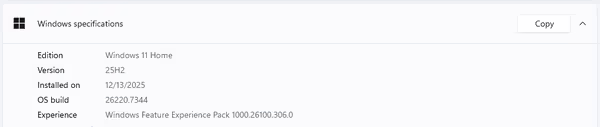
For the tests I used Windows 11 25H2 26220.7344 Insider Preview version to get all possible improvements taken into account.

Additionally, the x86_64 binaries properties were edited to enable newer emulated CPU features
:

WoW is an MMORPG, and it does not have a built-in benchmark. It can be reliably benchmarked to some extent if you use specific game areas/instances. You can check more in my WoW benchmarking section.
As a PC game, it's a modern DX12 game engine with optional ray-traced shadows support and a few other features. It offers native x86, Windows on ARM, and Apple Silicon versions. In my previous tests, the x86 retail version would not run on Snapdragon, and only the Classic version managed to run. The FPS drop versus the native version was massive of around 40-60% (but the testing wasn't as detailed as I would like).
With the Windows (and WoW) changes, both x86_64 WoW clients managed to run on Windows on ARM, allowing me to get way more test data. MSI Afterburner and other similar tools don't support WoA, so I had to use the game's built-in average FPS meter (which doesn't average over long periods of time; and no 1% lows/frame time graphs).

World of Warcraft - native versus emulated
I measured the FPS at 1080p for two settings - mode 3 (low) and mode 7 (high). The results are as follows:


The results are astounding as the x86 version is rivaling the native one, maybe even edging the native client.
- WoW Classic and Stonard in retail are old locations, very light to render, so even with an iGPU, the FPS will be high.
- Ardenweald is the most GPU-intensive modern zone from the test collection. Bastion is less demanding but has a bit more geometry. Dazar'alor harbor view is a geometry/render distance-based benchmark and will depend mostly on GPU
- Necrotic Wake and Spires of Ascension are dungeons with some mobs, geometry, and units the game tracks. GPU with increasing CPU load.
- Valdrakken is a player hub from the previous expansion, now mostly empty - player hubs when active are quite demanding to render without stutter. They tend to use a lot of assets as well.
- Combat benchmark is pushing the game into single-core CPU limit - it's done in the old Karazhan raid, where I can reliably pull a large group of mobs and stand still with fixed camera position. iGPUs can also be the bottleneck on higher settings due to particle effects of spells going off. Most dGPUs will have no problems with them.
- Out of combat, when test mobs despawn, the FPS inside Karazan increases as it's an old instance without any complex geometry or large asset collection. The game combat
world state
vanishes and thus the single-core bottleneck as well
Karazhan benchmark was the only one where the native version was noticeably ahead of the emulated version. Due to that, I've also added two modern dungeon instances, and those results were more in line with other locations. Either there was a difference between game versions, or in larger instances, game performance can be limited by some sort of system latency, and emulation is not the best for that.

WoW by default will use 4 CPU cores, with one core being the primary
ones. In a mass combat / mass NPC scenario, the main core will see 100% load and will be the limiting factor.

Windows on ARM can handle a lot of x86 Windows applications, but not all of them. From my quick re-tests, I managed to run Unigine Valley, but Unigine Superposition failed to run.
Default versus very strict emulation
I was curious what the difference between emulation settings. Switching to very strict
emulation settings disables a lot of features, which in turn tanked x86 WoW performance:

I've also recently tested Strix Point HX 370, and Intel Arrow Lake 255H capped at 30W, so I've added them to the comparison charts:


In iGPU-heavy scenarios, Intel/AMD tend to be ahead, while in CPU scenarios, all 3 platforms get close to each other.
I really wanted to compare native versus emulated on Snapdragon, as initial WoW Classic performance differences were huge. With recent Prism updates, I forced the devkit to update Windows, and it managed to run the x86 retail World of Warcraft client. This allowed me to test CPU and GPU-focused scenarios within the game. Surprisingly, for WoW, there was no real penalty, at least outside the raid/combat scenario. When you install Battle.net and WoW, you will get the native version by default, so you don't have to select or change anything.
It's good to see improvements to Windows on ARM. Better application compatibility is nice, but it will never be perfect. On top of that, some apps will have hardcoded checks, and you won't be able to use x86 drivers. Qualcomm is preparing the second generation of mobile X Elite chips, and it will be interesting to see how they perform. Initial launch saw a lot of laptop sales, but also a lot of returns.
Limited Linux support is still a problem, from device tree lists, firmware extraction, to overall worse behavior of the SoC under Linux. Linux ARM support is way better than Windows, and even some hardware vendors tend to support ARM Linux due to the Raspberry Pi (like astrophotography equipment, vision cameras).