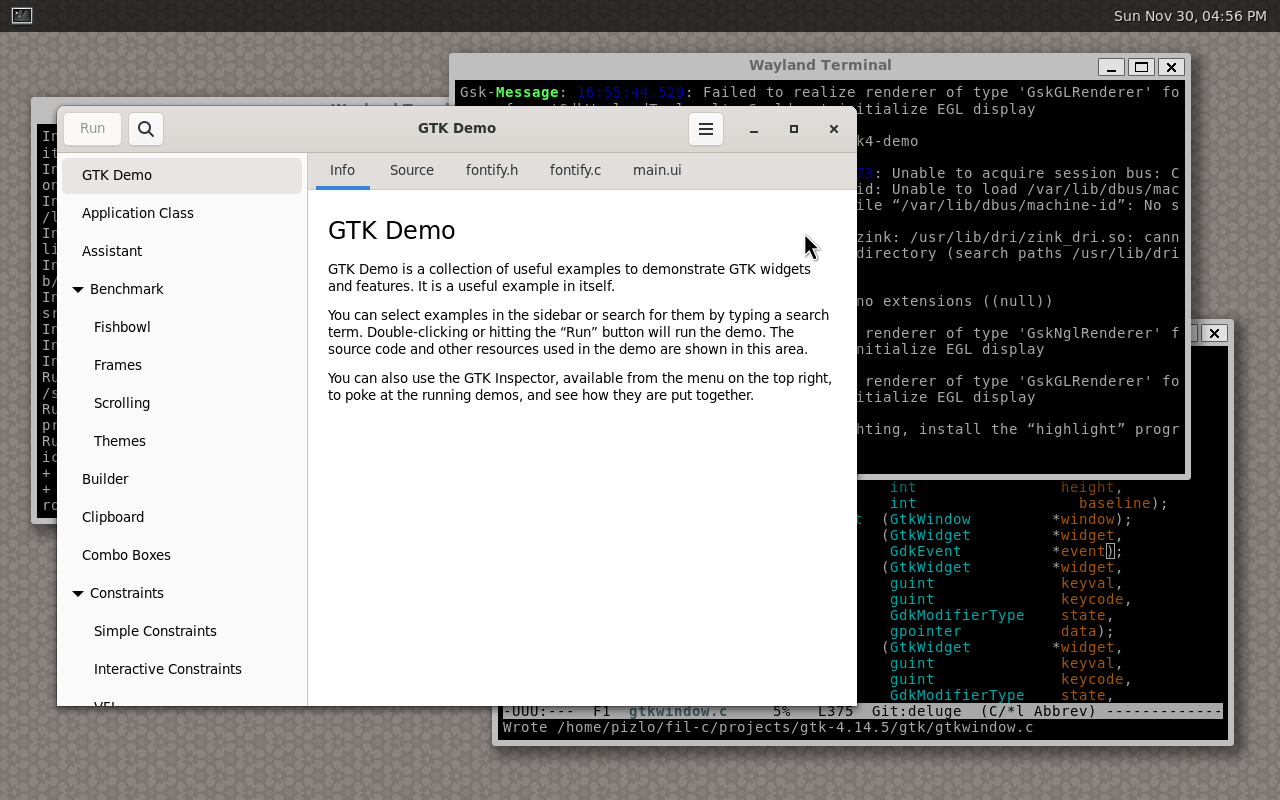

Pizlix is LFS (Linux From Scratch) 12.2 with some added components, where userland is compiled with Fil-C. This means you get the most memory safe Linux-like OS currently available.
Caveats:
The kernel is compiled with Yolo-C. So that you can compile the kernel, a copy of GCC is installed in
/yolo/bin/gcc.The C/C++ compiler is compiled with Yolo-C++. Some more information about that:
It's likely that a production memory safe OS would still let you run unsafe programs in cases where the security/performance trade-off was warranted. The compiler might be a good example of that.
I haven't yet ported LLVM to Fil-C++, and so long as I haven't, the compiler will have to be Yolo-C++.
The compiler is called
/usr/bin/clang-20but there are many symlinks to it (gcc,g++,cc,c++,clang, andclang++all point atclang-20).All of the other building-related tools (like
ld,make,ninja, etc) are compiled with Fil-C (or Fil-C++).
Pizlix is possible because Fil-C is so compatible with C and C++ that many packages in LFS need no changes, and the rest of them mostly just require small changes. That said, it's not as simple as just replacing LFS's compiler with the Fil-C compiler because:
The Fil-C compiler isn't set up to do the cross-compilation hacks that LFS uses in Chapters 5-7. Therefore, Pizlix uses the Yolo-C toolchain and vanilla versions of the temporary cross-tools in those chapters.
We need to retain the Yolo GCC for compiling the Linux kernel.
This document starts with a description of how to install and build Pizlix. At the end of this document, I explain exactly how Fil-C is injected into LFS.
Supported Systems
Pizlix has been tested inside VMware and Hyper-V on X86_64.
I have confirmed that it's possible to build Pizlix on Ubuntu 24.
Installing Pizlix
First, clone the Fil-C GH repo:
git clone https://github.com/pizlonator/fil-c.git
Then go into the pizlix directory under fil-c.
Pizlix requires you to set up your machine thusly:
You must have a
/mnt/lfspartition mounted at /dev/sda4. If you have it mounted somewhere else, then make sure you edit the various scripts in this directory (and its subdirectories).You must have a swap partition at
/dev/sda3. If you have one somewhere else (or don't have one), then make sure you edit the various scripts in this directory (and its subdirectories).You must have an
lfsuser as described in sections 4.3 and 4.4 of the LFS book.
Once you have satisfied those requirements, and you're happy with the contents of /mnt/lfs being annihilated, just do:
sudo ./build.sh
From fil-c/pizlix. Then, edit your grub config to include the menuentry in etc/grub_custom and reboot into Pizlix!
If you run into trouble, see the Build Stages.
Using Pizlix
Pizlix by default has the following configuration:
sshdis running. It's a memory safe OpenSSH daemon!seatdis running.There is a
rootuser with passwordroot.There is a user called
pizlowith passwordpizlo. This user is a sudoer.dhcpcdis set to connect you via DHCP oneth0, which is assumed to be ethernet, not wifi.
Please change the passwords, or better yet, replace the pizlo user with some other user, if your Pizlix install will face the network!
Once you get your internet to work (it will "just work" if eth0 is DHCP capable), you'll need to run:
make-ca -g
As root. Without this, curl and wget will have problems with HTTPS.
To see what this thing is really capable of, log in as a non-root user (like pizlo) and do:
weston
And enjoy a totally memory safe GUI!
Build Stages
The Pizlix build proceeds in the following stages.
The Pizlix build snapshots after each successful stage so that it's possible to restart the build at that stage later. This is great for troubleshooting!
Pre-LC
This is the bootstrapping phase that uses a Yolo-C GCC to build a Yolo-C toolchain within the /mnt/lfs chroot environment.
If you want to just do this stage of the build and nothing more, do sudo ./build_prelc.sh.
If you want to start the build here, do sudo ./build.sh.
LC
This is the phase where the chroot environment is pizlonated with a Fil-C compiler. This builds the Fil-C compiler and slams it into /mnt/lfs.
If you want to just do this stage of the build and nothing more, do sudo ./build_lc.sh.
If you want to start the build here, do sudo ./build_with_recovered_prelc.sh.
The Injecting Fil-C Into LFS section describes the LC phase, and its relationship to Pre-LC and Post-LC.
Post-LC
This is the actual Linux From Scratch build (Chapters 8, 9, 10 of the LFS book) using the Fil-C toolchain. After this completes, the Yolo-C stuff produced in Pre-LC is mostly eliminated, except for what is necessary to run the Fil-C compiler and the GCC used for building the kernel.
If you want to just do this stage of the build and nothing more, do sudo ./build_postlc.sh.
If you want to start the build here, do sudo ./build_with_recovered_lc.sh.
Post-LC 2
This builds BLFS (Beyond Linux From Scratch) components that I like to have, such as openssh, emacs, dhcpcd, and cmake.
If you want to just do this stage of the build and nothing more, do sudo ./build_postlc2.sh.
If you want to start the build here, do sudo ./build_with_recovered_postlc.sh.
Post-LC 3
This builds the Wayland environment and Weston so that you can have a GUI.
If you want to just do this stage of the build and nothing more, do sudo ./build_postlc3.sh.
If you want to start the build here, do sudo ./build_with_recovered_postlc2.sh.
Post-LC 4
This builds GTK 4.
If you want to just do this stage of the build and nothing more, do sudo ./build_postlc4.sh.
If you want to start the build here, do sudo ./build_with_recovered_postlc3.sh.
Other Tricks
You can mount the chroot's virtual filesystems with sudo ./build_mount.sh. You can unmount the chroot's virtual filesystems with sudo ./build_unmount.sh.
You can hop into the chroot with sudo ./enter_chroot.sh. However, if you're past Post-LC, then you'll need to do sudo ./enter_chroot_late.sh instead.
If you want to just rebuild libpizlo.so runtime and slam it into the chroot, do sudo ./rebuild_pas.sh.
If you want to just rebuild the compiler, libpizlo.so, and user glibc, do sudo ./rebuild_lc.sh.
Injecting Fil-C Into LFS
My process for building Pizlix started with writing shell scripts to automate the LFS build. This mostly involved copy-pasting the shell commands from the LFS book after manually validating that they worked for me.
Then, I studied the build process to identify the best injection point for Fil-C. That is, where to either compile or binary-drop the Fil-C compiler and have all subsequent build steps use that compiler. After some trial and error, I found that the second glibc build step (the one at start of Chapter 8) is the perfect point to transition from Yolo-C to Fil-C:
At this point, we are no longer building temporary cross versions of libraries in tools. We're building the final versions.
We have built good-enough versions of libraries and tools to support running the Fil-C compiler. Note that in preparation for this, I had already adjusted the clang build so that the binary has minimal dependencies and happens to dynamically link to a glibc with the same ABI version as LFS's glibc (version 2.40). It's great that glibc ABI is so stable these days that this is possible!
This is why the build stages have the names that they have:
Pre-LC: this is the "pre libc" part of the build, i.e. Chapters 5-7.
LC: this is the part of the build where LFS would have normally build the final (not cross) version of glibc, i.e. section 8.5.
Post-LC: this is all of the LFS build that happens after the final glibc step, i.e. everything after section 8.5. However, I also include the section 8.3 man-pages and section 8.4 iana-etc as the first steps of Post-LC. It turns out that it's OK to run these steps after the final glibc build.
Here's how the various build stages are modified to support Fil-C.
Modifying Pre-LC
In normal LFS, most of the Pre-LC tools are built with --prefix=/usr even though these are not the final versions of the tools. Post-LC overwrites the tools build in this bootstraping phase.
It turns out that I cannot quite do this for Fil-C, because Fil-C does not share ABI with Yolo-C. So, we do not want situations like:
Pre-LC builds library
libfoo.so.Pre-LC builds a binary
barthat dynamically linkslibfoo.so.Post-LC builds library
libfoo.soand overwrites the version from Pre-LC.
If we did that, then bar would stop functioning, since bar is a Yolo executable and libfoo.so is now a Fil library. The same kind of problem would occur if in step 3, Post-LC built bar with Fil-C - we'd have a Fil binary dynamically linking to a Yolo library. It wouldn't work!
So, Pre-LC takes the following approach:
We build everything with
--prefix=/yolo.We use symlinks to make it seem like everything is in
/usr. For example,/usr/binis a symlink to/yolo/binand/usr/libis a symlink to/yolo/lib. Also,/binis a symlink to/usr/binand/libis a symlink to/usr/lib.
At the end of Pre-LC, all libraries and binaries are actually installed in /yolo, but they function as if they were installed in /usr in the sense that the glibc loader is going to look for libraries in /lib and lots of software (like lots of shell scripts) point at /bin or /usr/bin directly.
Modifying LC
The LC phase is where most of the magic happens. LC has multiple substages: Fil-C build, yoloify, yolo glibc build, Fil-C binary drop, user glibc build, and finally libc++ binary drop. Note that the need for two glibcs - yolo and user - is due to the libc sandwich runtime.
Fil-C Build
The first stage of LC is to build Fil-C in a way that is almost identical to ./build_all_fast_glibc.sh except that we force the use of the kernel headers from the version of the kernel that Pizlix uses. We will use the clang compiler binary, libpizlo.so, libc++abi, and libc++ libraries as binary drops into Pizlix in later parts of LC.
This also packages up yolo glibc and user glibc so that they can be built inside the Pizlix chroot.
Yoloify
Now we break the symlinks from /usr to /yolo. To do this without breaking the bootstrap binaries, we also patchelf all of the binaries so that:
Also, all scripts that use absolute paths to their interpreter (i.e. #!) is in /yolo/bin.
Yolo glibc Build
Now we build yolo glibc (i.e. the version of glibc 2.40 hacked to be the Yolo libc in the Fil-C sandwich runtime) inside the Pizfix chroot. This is a very hacked glibc build:
We build yolo glibc using GCC, since it's a Yolo-C component that sits below the Fil-C runtime.
We disable a bunch of features, since Fil-C only uses this libc for syscalls in the Fil-C runtime. In the future, we could even get rid of the yolo libc altogether!
We pretend that
--prefix=/usr. In some ways, that's true.After glibc is installed, we delete everything it places in
/usrexcept for thelibc,libm, andld-linux-x86-64.so.2shared objects.We rename those shared objects so that
libc.so.6becomeslibyolocimpl.so,libm.so.6becomeslibyolomimpl.so, andld-linux-x86-64.so.2becomesld-yolo-x86_64.so.
Now, the yolo glibc is installed in such a way that libpizlo.so and the Fil-C compiler know how to find it. And, most importantly, it's installed in such a way that it stays out of the way of the user glibc (which will claim the libc and libm library namespace).
Fil-C Binary Drop
This part is very hackish! I haven't ported libpizlo.so to build with GCC. So, rather than porting it or having Yolo clang in Pre-LC, this step just binary drops the libpizlo.so we've already built into /usr/lib. This also drops the Fil-C headers into /usr/include.
This step also binary drops the Fil-C compiler - a clang binary that only dynamically links glibc ABI version 6 - into /usr/bin and sets up the symlinks (so gcc, g++, cc, c++, clang, and clang++ all point to this compiler).
User glibc Build
Now we build user glibc (i.e. the version of glibc 2.40 that has been ported to Fil-C) inside the Pizfix chroot. This is almost exactly the build process used in Section 8.5 of LFS, except we're using a version of glibc 2.40 that has been ported to Fil-C and we're compiling with the Fil-C compiler rather than GCC.
libc++ Binary Drop
Ideally, we'd build libc++abi and libc++ within the Pizfix chroot, but for now I'm being lazy so I just binary drop the versions I've already built.
This concludes the LC phase! Now it's possible to proceed with the rest of the LFS build. That build will end up using the Fil-C compiler even if the build scripts explicitly ask for gcc or g++, and they will get a Fil-C version of glibc, and libc++abi/libc++ as their C++ libraries.
Modifying Post-LC
Post-LC is almost exactly the LFS chapters 8-10 except for the glibc step (which we already did in the LC phase). The only changes are:
Some programs required minor modifications to work in Fil-C.
The Linux kernel needs to be built using two compilers. The "host" compiler is the Fil-C compiler. So, there are minor changes in the userlevel parts of the Linux kernel and the exact commands used to invoke the build are a bit more verbose.
Pizlix also includes a Post-LC 2, Post-LC 3, and Post-LC 4 phases that build some parts of BLFS 12.2 plus enough to run Weston and GTK 4.