I got my HP Zbook G1a (395, 128 GB version) a month ago for my research, manipulating big matrices (need large memory capacity) and running FDTD simulations (require large memory bandwidth). For those two primary workloads, I think Strix Halo fits quite well among current laptops in the market.
The following is my short impression on this, focusing on its performance numbers.
OS: Windows 11 Pro 24H2
Power plan: Best performance mode except as noted
0. Note on the power draw of AI Max+ 395 APU on Zbook Ultra G1a
In the Best performance mode, a continuous full CPU load draws peak power ~ 80W, and sustains a 70W draw for a few minutes. Then, the power draw gradually gets down to 45W after about 30 min running, reducing about 10% of all core clock speed from the start.
In the GPU load (like running LLM), the same applies: starts at ~80W, stays at 70W for a while, then gradually goes to 45W.
1. CPU-Z, Cinebench R23, 7-Zip
CPU-Z bench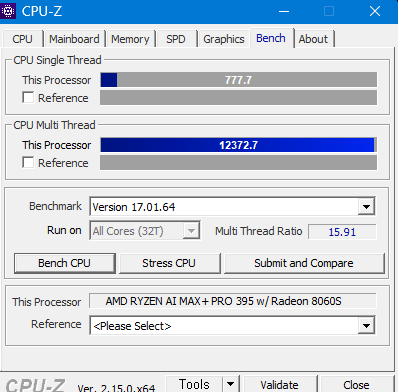
Cinebench R23
7-Zip bench
Fire Strike
Time Spy
2. Home-made FDTD calculation (comparison with CPU workstations)
FDTD is a memory-bandwidth-bound algorithm for numerical simulation of electrodynamics.
Results (steps per sec)
- AI Max+ 395 (256bit LPDDR5x 8000 MHz): 10.4
- Epyc 9654 2s (24ch DDR5 4800 MHz): 54.31
- TR 5995wx (8ch DDR4 3200 MHz): 12.1
- i9 7920x (4ch DDR4 2933 MHz): 4.49
It is amazing to see that this small laptop gives about 80% performance of TR 5995wx workstation in a memory-bandwidth-bound workload.
3. Local LLM and memory bandwidth
I’m a newbie at running a local LLM. Used LM Studio and just followed the simple instructions to run. So please note that the results could be misleading in some details.
The following is a result of Phi4 reasoning plus Q8 (15.5 GB) model, asked to evaluate an integral by using complex analysis. The context window size was set to be 24k, and Vulcan was used to run on the GPU. (The integral is quite tricky, though the answer is correct. Amazing.  )
)
I heard the memory bandwidth matters in LLM, and this laptop gives a 205 GB/s reading bandwidth while running the LLM, which is more than 80% of the theoretical peak.
One interesting thing is that, in my experience, setting a large dedicated GPU memory is not quite important. The laptop was able to load llama 3.3 70B Q8 (~75GB) with just 32GB of dedicated GPU memory. The rest of the data was loaded on the “shared” GPU memory. The same memory bandwidth (~200 GB/s) was observed in this case also.
4. COMSOL Multiphysics
For benchmark details, you can refer to the following topic.
I have run the CFD-only model, and here are the results.
- 36m 48s (-np 16)
- 35m 56s (-np 16 -blas aocl)
During the benchmark, the peak memory bandwidth was observed as ~72GB/s for reading.
5. Things that make performance-squeezing-out tricky on Windows
-
Regardless of the power plan, the second CCD remains parked by default—even when running on AC power—and it doesn’t wake up unless all 16 threads (8 cores + 8 SMT) are fully utilized. As a result, if you run a 16-threaded program, the second CCD won’t be activated. I’m not sure whether this behavior is controlled by AMD or HP, but I hope this policy will be changed later.
-
So, to make use of 16 threads across the two CCDs while running the COMSOL benchmark, I had to use Process Lasso to manually wake up the second CCD.
-
It would be best if HP provided an option to disable SMT in the BIOS, but I could not find it. Considering this laptop is intended for workstation use, I think this is more or less disappointing.