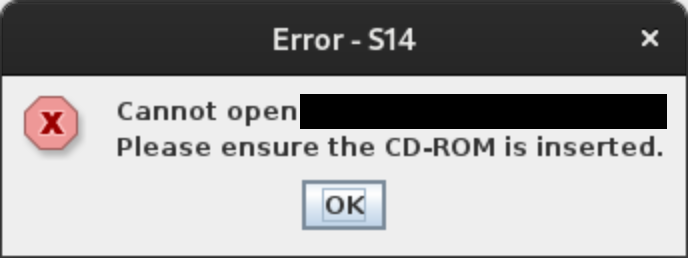
I have an old reference CD that I've been wanting to use without an external drive and the actual disk. However, the application won't launch without the CD:

Sometime last year, I wondered if I could figure out how to bypass the CD presence check. After a few attempts at decompiling the application, I finally found the key function:
public class Start {
  public static void main(String[] paramArrayOfString) {
    if (paramArrayOfString.length == 2 && paramArrayOfString[0].equals("Invalid") && paramArrayOfString[1].equals("class")) {
      fu.main(new String[] { "none" });
      return;
    }
    Object object = new Object();
    BorderLayout borderLayout = new BorderLayout(30, 30);
    Frame frame;
    (frame = new Frame("Application")).setLayout(borderLayout);
    frame.add(new Label("   Application - loading..."));
    Toolkit toolkit;
    Dimension dimension = (toolkit = Toolkit.getDefaultToolkit()).getScreenSize();
    frame.setLocation(dimension.width / 2 - 80, dimension.height / 2 - 40);
    frame.pack();
    frame.setVisible(true);
    synchronized (object) {
      try {
        object.wait(3000L);
      } catch (InterruptedException interruptedException) {}
    }
    JOptionPane.showMessageDialog(null, "Cannot open [redacted].\nPlease ensure the CD-ROM is inserted.");
    System.exit(1);
  }
}
The application is simply checking that it's invoked with the arguments "Invalid class". If yes, then it starts the real entrypoint in fu.main; if no, it waits three seconds to pretend that it's working, then shows the error message!
The application launcher provides the secret arguments. In the Windows version, the launcher is obfuscated and I wasn't able to make sense of it when decompiled. (I believe it also does more sophisticated CD presence checks before launching the program.) I discovered the code above when I finally thought to look at the macOS launcher, which was simply a shell script that invoked the program with the right arguments.
Some testing showed that everything works perfectly on Linux, so I made a .desktop file that invokes the program with the magic words. I'm extra happy because Linux isn't one of the officially supported platforms, but with the platform-specific launchers out of the way, it works as-expected.