When I switched from an iMac to a Mac mini in late 2024 I choose an ASUS ProArt 5K PA27JCV (24″, 60 Hz) for the monitor and while it looked great, it died after 14 months, seemingly with a backlight or power supply problem. ASUS’ warranty support requires shipping the monitor back, potentially waiting 3-4 weeks, and then getting a replacement. And worse, the replacement could have dead pixels, as the ASUS warranty doesn’t consider ≤5 dark pixels a problem.
The old HP ZR2440w that I swapped in as a spare wasn’t cutting it, so with an indeterminate wait ahead of me, potentially receiving something with bad pixels, and my being vaguely interested in something larger and with a faster refresh rate I went looking at new monitors.
Coming to the realization that 4K is probably fine I picked up a Dell 32 Plus 4K QD-OLED Monitor – S3225QC from Costco for $499. It was well reviewed online and looked pretty good when I played with one for about 20 minutes at Micro Center. When I got home and sat in front of it doing my normal things it looked a bit… different… almost as if my glasses weren’t working quite right. But I figured new monitor tech just needed some time for me to get accustomed to. After all, it had a very high contrast ratio and sharp pixels; maybe it’s just that?
After a few days it still didn’t feel right, so I began looking for a solution. Costco has a 90-day return window for computer monitors, so I had some time, but this didn’t look good; I wanted an answer soon.
I was fortunate to be able to borrow a Dell UltraSharp 32 4K USB-C Hub Monitor U3223QE for the weekend, which was perfect as being a being a high end display with the same resolution and panel size as the S3225QC I could compare them side by side. And in the end the LCD just looked better.
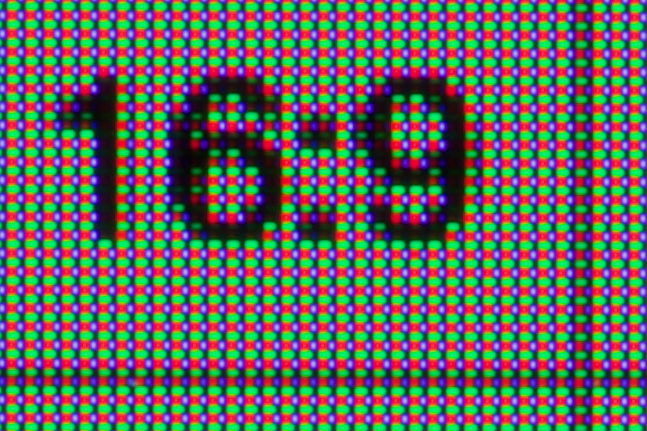
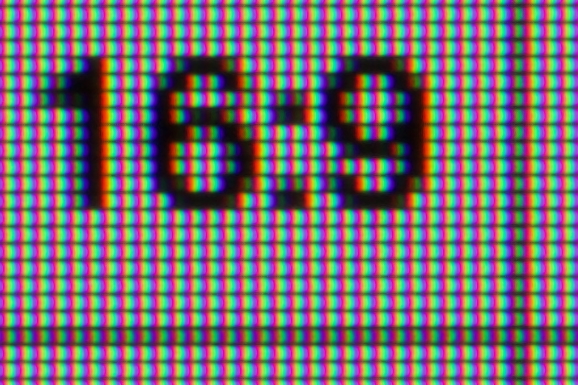
I took some macro photos of both displays and it turns out that what was bothering me was fringing, a problem common to OLEDs. It was hard to point out during normal use other than text-is-a-bit-blurry-and-weird , or like an oversharpened image, or almost like artifacted text in a JPEG image, but with photos it was much easier to see what’s going on. And better, the cause: the arrangement of the subpixels; the little red/blue/green dots that make up a pixel.
As shown above, the subpixles in the Dell S3225QC QD-OLED form a square with green on the top, a larger red pixel in the lower left, and smaller blue in the lower right. The Dell U3223QE, a typical LCD, has three vertical stripes making a square. The result being that high contrast edges look very different on an OLED, often with a strong off-color border — or fringe — along horizontal and vertical lines.
In the photos above, note the vertical part of the 1 which has red and green dots along its right side, and large red dots along the top of the 6 with green along the bottom. These are the strongly colored fringes. (On the LCD they appear white as the three equal size subpixels pixels act equally.)
This meant that things that I tend to do, text or fine lines in maps or CAD-type drawing, are not right at all on the pixel pattern found in this OLED panel. Beyond the pixel pattern, I also suspect that the much crisper pixels (defined points of light) contribute to the fringing having an artifacting-like effect.
This was much more pronounced when looking at light text on a dark background; the way that I read most websites. Visual Studio Code does a wonderful job demonstrating this problem:


This gets at why OLEDs make great TVs and gaming monitors. The contrast is outstanding, color is excellent, and high refresh rates are ideal for moving images and fast-response games. And there’s no noticeable fringing because edges are constantly moving across pixels; almost nothing is still. They also work great on small devices like phones where the pixel density is so high that fringing is too small to see.
But on desktop monitors for still things — text and fine lines — OLEDs currently just aren’t great; I guess that’s why office and productivity type monitors are still LCDs. Even though I don’t like being that person who returns computer stuff just because they don’t like it, I ended up returning the monitor after only four days of using it. The S3225QC and it’s QD-OLED just doesn’t work for me; it made my eyes feel funny to use.
Within the past few weeks LG has announced RGB stripe OLED panels which will resolve this problem, but there aren’t currently any monitors available using these panels, so back to an LCD I’ll go. (It looks like ASUS and MSI will some them available soon, but only as wide-screen gaming monitors. And I suspect the first ones available will be fairly expensive.)
Whether this’ll be buying my own U3223QE, perhaps a Dell U3225QE (adds 120 Hz scanning, an ambient light sensor, and a Thunderbolt dock), or just waiting for an ASUS PA27JCV to come back, I’m not sure… But whatever I end up using will, for now, will be an LCD, not an OLED.