Part 1 | Part 2 | Part 3 | Part 4
TL;DR: I built a screen-timer device & web app — see a video of it here

Introduction
I love a good coding side-project in the holidays. (sound the nerd klaxon 📣) It’s fun to solve problems and learn new systems in a more relaxed environment where a couple of beers and a bit of YOLO refactoring are actively encouraged. And, of course, a suitable excuse for playing with new shiny things.
The screen time conundrum

It’s a been a fun Christmas, but there have been some interesting challenges. Our two children (age 11 and 13) get a screen time allowance each day – and they want to share it across multiple devices. Getting the various parental control systems (iOS, MacOS, Family Link, Nintendo and PS5) to sync nicely with each other is impossible, and manually moving around the screen time limits (“Dad, can I have my Nintendo time on the iPad?”) was causing stress and taking up far too much of my life.
After giving the problem some thought, and conducting thorough interviews with the stakeholders 😉, my key insight was that this isn’t a trust problem. Our kids are reasonably compliant with screen time rules; they’ve had plenty of school lessons around device addiction and healthy lifestyles. The real challenge is around accurate measurement – after our son has been lost in a Fortnite wormhole, his estimation of ‘time spent’ is hilariously bad. His shock and denial when confronted with the truth mirrors that of most adults when their phone’s monthly screen time summary pops up!
Another challenge is over-reliance on this whole ‘sync then shutdown’ approach for automatic enforcement – to date, the kids have been relying on these built-in controls to automatically disable their devices when ‘time’s up’. Not only does this make them dependent on this feature (ie it shifts accountability), it’s also proving unrealistic to implement across so many platforms.
A radical solution?
I propose that we try something a bit different – remove the enforcement and trust the kids to come off when their time is up. And, by doing this, we can at least aim to give them accurate screen time measurement by creating a separate, unified screen time measurement alarm.
If it works, they’ll feel more trusted and empowered, we’ll feel more confident and less stressed.
Enter ‘Screenie’. Essentially, the cleverest egg timer ever built.
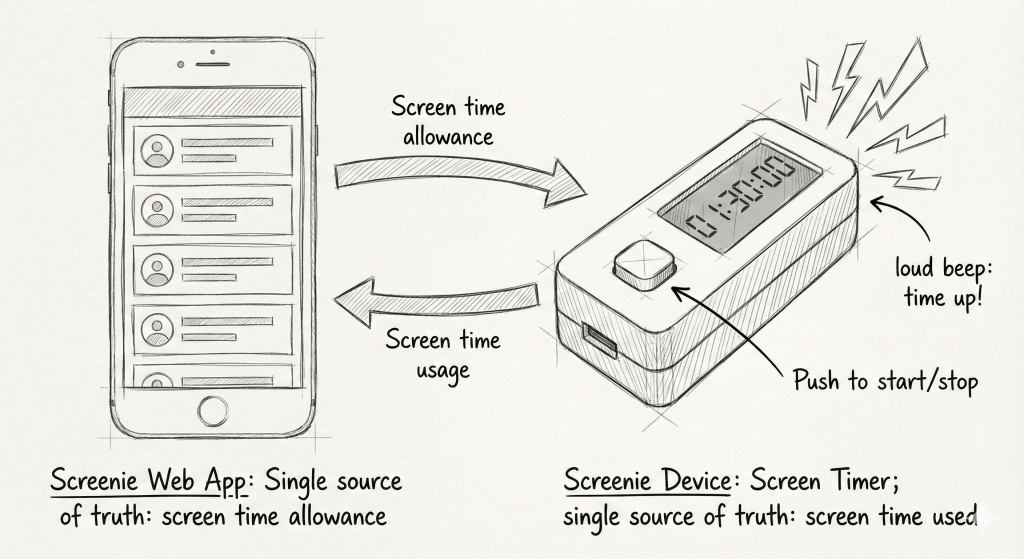
The theory of Screenie is:
- The child carries around a tiny device that records their screen time. One simple button to start/stop the timer.
- A parental app serves as the single source of truth for the screen time allowance; set weekly limits, bedtimes, and so on.
- Sync between the two, so the kids can see their allowance, and the parents can see how much they’ve used. Maybe I can even let them ‘request more time’ and send a push notification to the parent app.
There’s just one golden rule – the kids must promise to use the timer. If you feel the need to police this, spot checks should be relatively easy: both visually (is the device nearby? Is its timer running?), and also via the web app which shows current screen time sessions and durations.
Why a physical device
Why not? Call it a product hunch. There’s something very visible about a small, bright, dedicated device on the table; it commands a sense of importance, reflecting the requirement for the children to use it. It’s true that ‘Screenie’ could easily be a mobile or smartwatch app too (and you’re welcome to build one of those too) But our daughter doesn’t have a smartphone yet, and forcing another screen on her to limit her screen time felt counter-intuitive. On a final note, there’s something pleasingly old-school about a single-purpose device. Am I selling this to yet, or does this feel like a list of nerd excuses to play with new gadgets? There’s only one way to find out…
It’s time to pick some hardware, jump into the product design and coding hotseat, then bring Screenie to life!
Next up: Part 2 – Building and coding the hardware