In the ongoing effort for activities that fill the void made by unemployment, I have recently started to learn Chinese. Got into a Chinese language institute and everything. And because not every app supports right-clicking some text and selecting the "Translate" menu option, I found mysekf launching TextEdit just to do that. So, I figured, maybe I can do a small command line tool where I'd write something like:
translate 你好And the terminal would hppily tell me it means "Hello". Should be easy. A hungry ghost trapped in a jar can probably figure it out in one shot.
First I figured I'd look for some translation API. Almost everything I looked at seemed to want an API token and there is a rate limit (not that I'd hit it), and maybe a credit card number. Then I remembered that macOS has that Translate right click action, surely I can just hook into that.
Note that this article, unlike what I do usually, is written after the fact.
First Steps
Zig
I have been using Zig for different project this year. So I got the Ghost to write the thing for me, and it even gave me the correct flags to pass to the compiler! But then when I tried it, I realized it used the Dictionary service instead of the Translation service. When I asked it for that instead, it was like yeah you cannot call Swift async functions from Zig, you need a Swift shim.
So let's do the thing in Swift instead. I have been meaning to learn Swift anyway.
MyCLI
Thankfully, Swift was already set up on my machine with an LSP and a formatter and the works. I had even followed the basic tutorial and the file is on my machine already, A small edit and I can be on my way.
For reference, this is the code at the end of the tutorial:
import ArgumentParser
import Figlet
@main
struct FigletTool: ParsableCommand {
@Option: "Specify the input"
public var input: String
public func run() throws {
Figlet.say(self.input)
}
}After so long in Rust and Zig lands, the most jarring thing about Swift so far is that import creates glob imports. This is not quite apparent here, but it is there. Also, this is the accompanying Package.swift, comments and all.
import PackageDescription

let package = Package(
    name: "MyCLI",
    dependencies: [
      .package(url: "https://github.com/apple/example-package-figlet", branch: "main"),
      .package(url: "https://github.com/apple/swift-argument-parser", from: "1.0.0"),
    ],
    targets: [


        .executableTarget(
            name: "MyCLI",
            dependencies: [
                .product(name: "Figlet", package: "example-package-figlet"),
                .product(name: "ArgumentParser", package: "swift-argument-parser"),
            ],
            path: "Sources"),
    ]
)
This is run with swift run, but to pass arguments, one needs to do the following:
swift run MyCLI --input HelloI spent like 15 minutes trying different variations of this
swift run -- --input HelloAnyway, I deleted the Figlet related lines and went from there.
False Starts
I asked the Ghost in the Jar for how the API to use it looks like, but every version it gave me was hallucinated in some fashion. So I wrote import Translation at the top of the file, and figured maybe I can figure it out as I go along. Here is the Apple API documentation. A quick look tells you all the functions in here return a some View, and the only function seemingly unrelated to SwiftUI is the init function in TranslationSession, which, annoyingly, needs a known source language.
So I do this
import ArgumentParser
import Translation
@main
struct Translate: ParsableCommand {
@Argument: "Specify the input"
public var input: String
public func run() async throws {
print(">\t\(input)")
let source = Locale.Language(identifier: "zh_CN")
let target = Locale.Language(identifier: "en_US")
let session = TranslationSession(installedSource: source, target: target)
let response = try await session.translate(input)
let result = response.targetText
print(">\t\(result)")
}
}You can see the number of small changes to the original file here. I changed the struct's name (because it shows up in the --help message.) I changed Option to Argument so it does not need a flag. I even turned run into an async function so I can await the session.translate function call.
However, I start to hit a couple of snags. First is that TranslationSession.init is restricted to macOS 26. Not wanting to do a bunch of conditional compilation, (after all this tool is for my own use), I will just add the platforms field in Package.swift。 Oh it needs to be be before dependencies? Fine, whatever.
import PackageDescription

let package = Package(
	name: "MyCLI",
	platforms: [
		.macOS()
	],
	dependencies: [
		.package(url: "https://github.com/apple/swift-argument-parser", from: "1.0.0")
	],
	targets: [


		.executableTarget(
			name: "MyCLI",
			dependencies: [
				.product(name: "ArgumentParser", package: "swift-argument-parser")
			],
			path: "Sources",
		)
	]
)
I cannot find .v26 in the LSP's drop down. There is no .Tahoe either. Even if I type it manually, I get an error. I am on Tahoe. I have the latest version of Swift (I checked). why can't I select it from here?
You probably already know this, but apparently the first line in the file, that comment, is actually significant. I edited that to say swift-tools-version: 6.2, and now I can write .v26 in peace. I hate syntactic comments.
Ok, the LSP is happy. The compiler seems happy. Let's get going.
Async Woes
Running this with swift run -q MyCLI 你好 gives the following message:
USAGE: translate <input>

ARGUMENTS:
  <input>                 Specify the input

OPTIONS:
  -h, --help              Show help information.
Eh, I clearly passed in something. What gives? I tried changing Argument back to Option, same result. Hm. I realized that the problem maybe is that run is not supposed to be async. Fine, let's remove async, but then how do I call session.translate ?
Looking things up, and communing with ghosts, apparently I can wrap thing in Task. Sure.
Task {
	let response = try await session.translate(input)
	let result = response.targetText

	print(">\t\(result)")
}
And this runs! I rerun the command I do swift run -q MyCLI 你好 and I get ... nothing. Just the print message that prints input at the start. I think hah .. I have falled into the classic trap, I am spawning a Task but I am not waiting for it. How do I wait for it?
The ghosts suggested a DispatchSemaphore. This is the full code:
import ArgumentParser
import Translation
@main
struct Translate: ParsableCommand {
@Argument: "Specify the input"
public var input: String
public func run() throws {
print(">\t\(input)")
let source = Locale.Language(identifier: "zh_CN")
let target = Locale.Language(identifier: "en_US")
let session = TranslationSession(installedSource: source, target: target)
let semaphore = DispatchSemaphore(value: 0)
Task {
let response = try await session.translate(input)
let result = response.targetText
print(">\t\(result)")
semaphore.signal()
}
semaphore.wait()
}
}Ok .. for some reason, when I tried this right now, it actually works. But when I tried it before, probably with a sdifferent arrangement of stuff, it did not. It just froze and gave no feedback. The power of hindsight, I guess.
Nonetheless, since it did not work, I figured I was doing something wrong. So I searched for "how to call an async function from a sync function in Swift", and came across What calls the first async function? from Hacking With Swift, and the tl;dr of that article was "not you, just makw your main async". Very helpful, Paul. Apparently I needed to make run async. I looked into the docs of swift-argument-parser, I fgured surely they have some guidance on how to deal with async functions. Apparently the guidance was just to replace the ParsableCommand protocol with AsyncParsableCommand. Ok, now I felt like an idiot. This is the full code:
import ArgumentParser
import Translation
@main
struct Translate: AsyncParsableCommand {
@Argument: "Specify the input"
public var input: String
public func run() async throws {
print(">\t\(input)")
let source = Locale.Language(identifier: "zh_CN")
let target = Locale.Language(identifier: "en_US")
let session = TranslationSession(installedSource: source, target: target)
let response = try await session.translate(input)
let result = response.targetText
print(">\t\(result)")
}
}Works like magic now. Except, at the time, it did not. It gave me the following message:
>	你好
Error: Unable to Translate
Also it leaves the small detail of autodetecting the language, which is here hardcoded as zh_CN.
Language Recognition
The error had zero feedback. Absolutely unhelpful. No idea what's going on. I added a try await session.prepareTranslation() line I saw in some online examples, but .. nothing. I looked a bit more around for tutorials, I could not find anything. All tutorials just regurgitate the same SwiftUI code examples, but I am not using SwiftUI. Ekh.
Eventually, I came across the original WWDC video introducing the Translation API, and decided to watch it. And it was actually very helpful, despite it being SwiftUI focuded.
It does not touch on how to use TranslationSession.init, instead it mentions that a session is given to you to run in a SwiftUI closure. It gives the rationale behind the API, but it also introduces the bit I needed for autodetection, and that is NLLanguageRecognizer.
NaturalLanguage is an Apple framework for dealing with natural language (How did you guess?). I pretty much copied the code from the video into its own function (after import NaturalLanguage).
func identify_lang(_ sample: String) -> Locale.Language? {
	let recognizer = NLLanguageRecognizer()
	recognizer.processString(sample)
	guard let language = recognizer.dominantLanguage else { return nil }

	return Locale.Language(identifier: language.rawValue)
}
And this is my new func run()
public func run() async throws {
	print(">\t\(input)")


	let source = identify_lang(input)!
	let target = Locale.Language(identifier: "en_US")

	let session = TranslationSession(installedSource: source, target: target)
	try await session.prepareTranslation()

	let response = try await session.translate(input)
	let result = response.targetText

	print(">\t\(result)")

}
The other thing the video pointed out, is that the API user should check language availability. I saw that earlier, but did not particularly care. I know Chinese and English are available. I have been using them! Nonetheless, I copied that code as well just to be thorough, to figure out what the API does.
let availability = LanguageAvailability()
let is_it = await availability.status(from: source, to: target)
switch is_it {
case .unsupported:
	print("> language pairing from \(source.languageCode) to \(target.languageCode) unsupprted")
	return
case .supported:
	print("> language pairing from \(source.languageCode!) to \(target.languageCode!) not installed")
	return
case .installed:
	break
}
This gave me a compile error, as it happens, as apparently the enum is marked the Swift equivelant of #[non_exhaustive]. Going over StackOverflow and the Swift book, told me the answer is to add a @unknown default: case. I could not quickly figure out how to merge it with another case so I did not bother.
To my surprise, the pairing returned .supported, and not .installed. In a SwiftUI app, the try await session.prepareTranslation() call creates a pop up to ask the user to download the model.
But it is already installed! I am already using it via the right click menu! Nonetheless, that must be the reason for the Unable to Translate error.
Installing Models
Communing again with Ghosts, they told me to install the models through System Settings, General, Language, etc. I went where they told me, to this dialogue, where I can install the models locally.
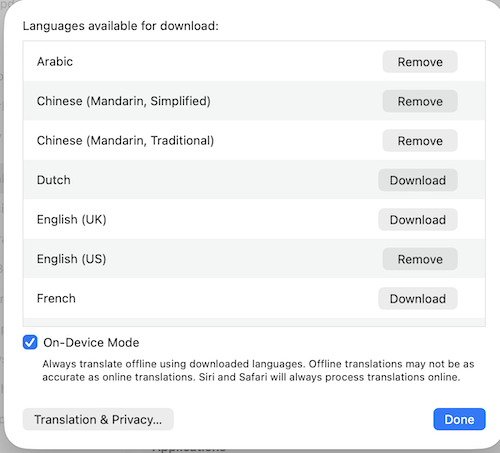
You can see that Mandarin is installed now, but the only language installed at the time was English(US). No matter, I installed Mandarin SImplified and Arabic, and added a note to the switch above showing where to install the items. And then I tried again: swift run -q MyCLI 你好.
And .. same error. I guessed that it identified the language as Mandarin Traditional for some reason, so I installed that as well, and now it works, finally!!
% swift/MyCLI ❭ swift run -q MyCLI 你好
>	你好
>	Hello
Why was that so hard? Why are the models here separate from the ones in the right click menu? Too many questions.
Final Code
This is the full final code, with some proper error names thrown in for good measure.
import ArgumentParser
import NaturalLanguage
import Translation
@main
struct Translate: AsyncParsableCommand {
@Argument: "Specify the input"
public var input: String
public func run() async throws {
print(">\t\(input)")
let target = Locale.Language(identifier: "en_US")
guard let source = identify_lang(input) else {
print("> could not identify language")
throw CliError.Recognitionfailed
}
let availability = LanguageAvailability()
let is_it = await availability.status(from: source, to: target)
switch is_it {
case .unsupported:
print("> language pairing from \(source.languageCode) to \(target.languageCode) unsupprted")
throw CliError.PairingUnsupported
case .supported:
print("> language pairing from \(source.languageCode!) to \(target.languageCode!) not installed")
print("> Go to System Settings > General > Language & Region > Translation Languages and download the models.")
throw CliError.PairingNotInstalled
case .installed:
break
@unknown default:
print("Unknown status.")
}
let session = TranslationSession(installedSource: source, target: target)
try await session.prepareTranslation()
let response = try await session.translate(input)
let result = response.targetText
print(">\t\(result)")
}
}
func identify_lang(_ sample: String) -> Locale.Language? {
let recognizer = NLLanguageRecognizer()
recognizer.processString(sample)
guard let language = recognizer.dominantLanguage else { return nil }
return Locale.Language(identifier: language.rawValue)
}
enum CliError: Error {
case Recognitionfailed
case PairingUnsupported
case PairingNotInstalled
}So I compiled it for release, put it in /usr/local/bin, and called it a day. You can see an example of a failing call if you do swift run -q MyCLI Bonjour, where it prompts to install the dictionary.
In Conclusion
To rub some salt on the wound, during the time I was trying to puzzle this out, I realized that Spotlight (with the Cmd+Space key) can already do this exactly How I envisioned it, with around the same number of keyatrokes, and it does not need this dance with installing models and whatever.
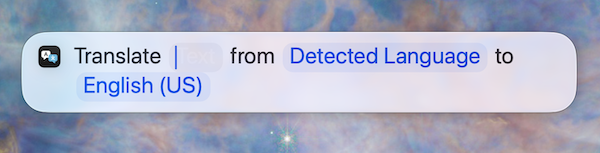
Also, Swift is frustrating. API of Swift libraries is frustrating.
Until later.