For some, Spotlight and even Siri are indispensable, for others they’re just a waste of CPU and storage space. If you want to disable them, how is that best achieved?
Siri
The only documented way to turn Siri off is in its section in System Settings, where you should disable Siri Requests.
Although Siri will then be essentially inactive, it still doesn’t disappear. During startup, siriactionsd runs, and siriknowledged and some other of its services remain listed in Activity Monitor.
Spotlight
If you disable every item in Spotlight’s section in System Settings, that doesn’t disable Spotlight, nor stop it from indexing mounted volumes. Indeed, you may find it slows some Finder operations. Traditionally there have been two commands used in Terminal to try to disable Spotlight, depending on which of its features you want to stop.
The most common recommendation is to usesudo mdutil -a -i off
to disable Spotlight indexing, but that doesn’t stop its searches, and it may not even do that on the current Data volume. When you run that command, mdutil should inform you that indexing is disabled on each mounted volume, and Spotlight has been switched to kMDConfigSearchLevelFSSearchOnly. Although that’s reported for the root volume / and the Data volume at /System/Volumes/Data, I was still able to search and find files in the latter after running that command.
This might be related to previously reported problems disabling just the Data volume, which could require use of the explicit path /System/Volumes/Data.
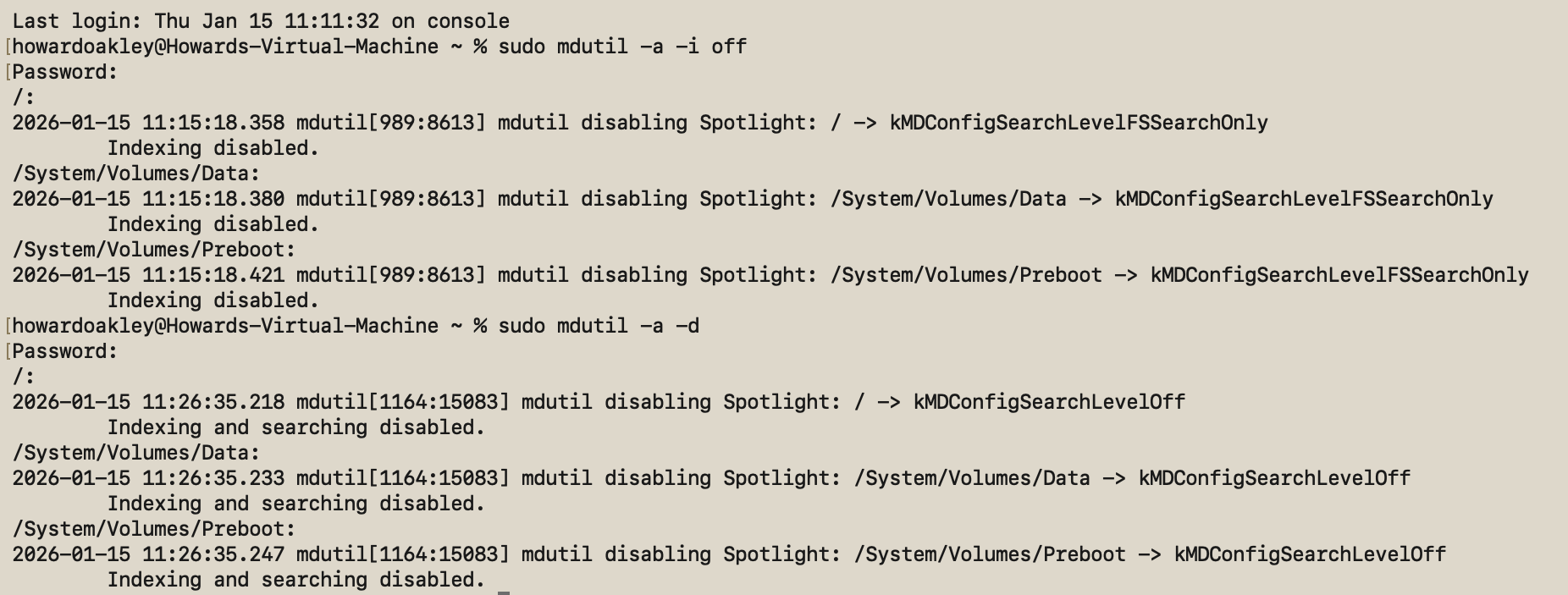
The alternative is to usesudo mdutil -a -d
as that disables both Spotlight searches and Spotlight indexing, and appears to be effective on the current Data volume. mdutil will then inform you that indexing and searching are disabled on each mounted volume, and Spotlight has been switched to kMDConfigSearchLevelOff. That ensures all attempts to search will fail to return any hits.
Look carefully, though, and Spotlight hasn’t gone anywhere, and is still present in Activity Monitor’s list of processes. During startup you’ll still see its related daemons mediaanalysisd and photoanalysisd run briefly, and mds, Spotlight and spotlightknowledged are still present in the list of processes. Volumes will also have their hidden .Spotlight-V100 folder, although after mdutil -a -d its Store-V2 folder should remain completely empty.
Should you wish to enable Spotlighting indexing again, regardless of which command was used to disable it, usesudo mdutil -a -i on
which should report that indexing has been enabled on each mounted volume.
Conclusions
It’s not possible in macOS Tahoe to completely disable either Siri or Spotlight, not without resorting to system surgery and running with SIP disabled. However, you can reduce them to an absolute minimum by:
- turning Siri Requests off in Siri settings;
- running the command
sudo mdutil -a -din Terminal.
But using sudo mdutil -a -i off isn’t as thorough or reliable.