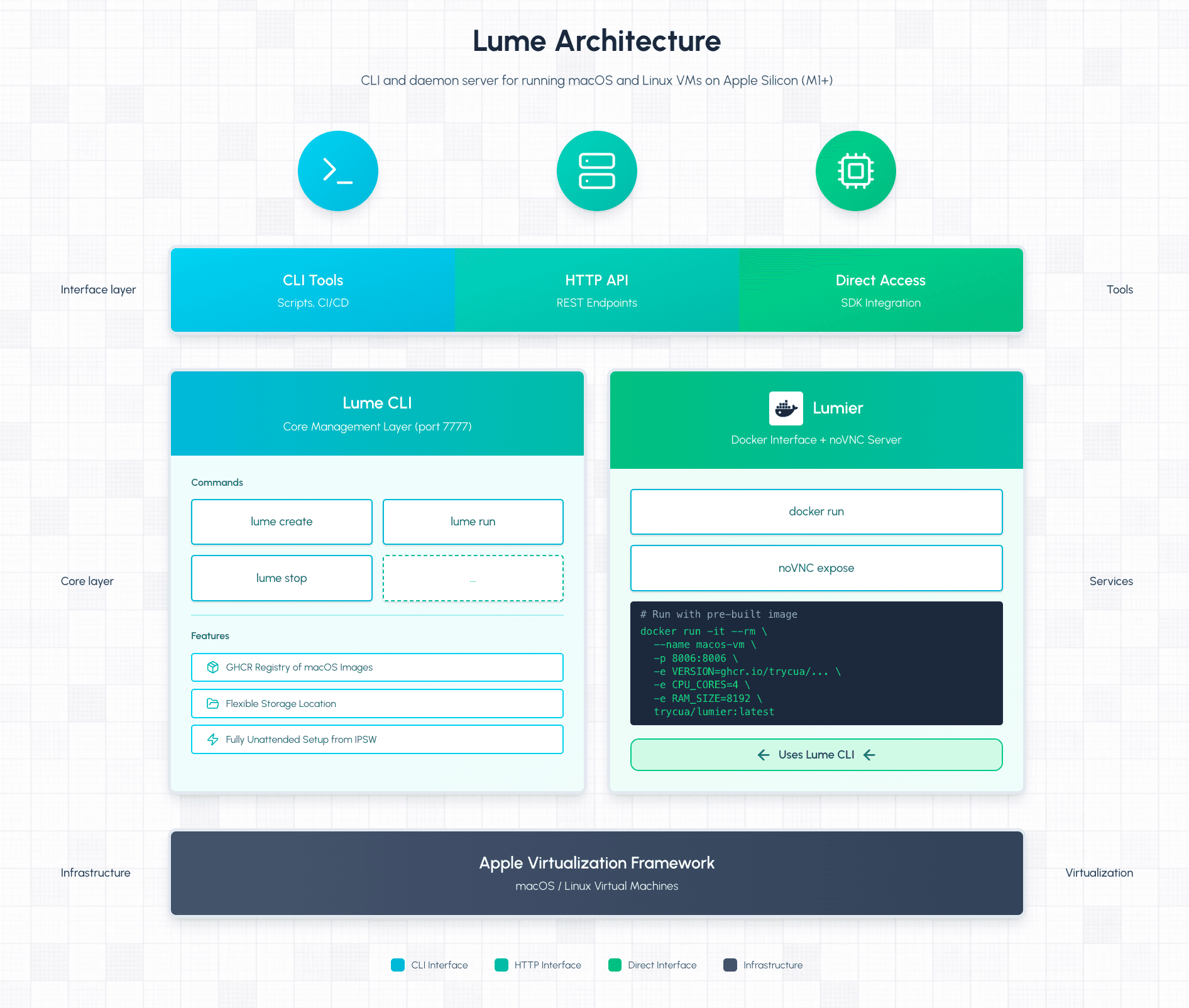
Lume is a VM runtime for building AI agents, running CI/CD pipelines, and automating macOS. It uses Apple's native Virtualization Framework to run macOS and Linux VMs at near-native speed on Apple Silicon.
MIT License
Lume is open-source and MIT licensed. If you find it useful, we'd appreciate a star on GitHub!
Cloud macOS Sandboxes
We're piloting a managed service for customers who want to run cloud macOS sandboxes for CI/CD and agent workloads. Book a demo if you're interested.
lume create test-vm --os macos --ipsw latest
lume run test-vm
A single binary with an HTTP API. Create a VM, run it headlessly, control it programmatically.

You can use Lume directly via CLI, or run lume serve to expose an HTTP API for programmatic access. The Computer SDK uses this API to automate macOS interactions.
Lume is a thin layer over Apple's Virtualization Framework, which provides hardware-accelerated virtualization on Apple Silicon. This gives you:
- Native speed — CPU instructions execute directly via hardware virtualization
- Paravirtualized graphics — Basic GPU support via Apple's virtualization layer (limited to GPU Family 5)
- Efficient storage — Sparse disk files only consume actual usage, not allocated size
- Rosetta 2 support — Run x86 Linux binaries in ARM Linux VMs
- Automated golden images — Go from IPSW to fully configured macOS VM without manual intervention
- Registry support — Pull and push VM images from GHCR or GCS registries
Testing across macOS versions — Spin up a VM with a specific macOS version, test your software, tear it down. No need to maintain multiple physical machines.
Automating macOS tasks — Combine Lume with Unattended Setup to create pre-configured VMs. The setup automation uses VNC and OCR to click through the Setup Assistant without manual intervention.
Running CI/CD locally — Test your macOS builds in isolated VMs before pushing to remote CI. The --no-display flag runs VMs headlessly.
Sandboxing risky operations — Need to test untrusted software or destructive scripts? Run them in a VM, then delete it. Clone a known-good VM to reset to a clean state instantly.
Building AI agents — Lume powers the Cua Computer SDK, providing VMs that AI models can interact with through screenshots and input simulation.
Used by Anthropic
Apple's Virtualization Framework—the same technology Lume is built on—powers Claude Cowork, Anthropic's sandboxed environment for Claude Code. It downloads a Linux root filesystem and boots it in an isolated VM where Claude can safely execute commands without access to your broader system.
Lume requires Apple Silicon—it won't work on Intel Macs or other platforms.
Ready to try it? Install Lume and create your first VM in the Quickstart.