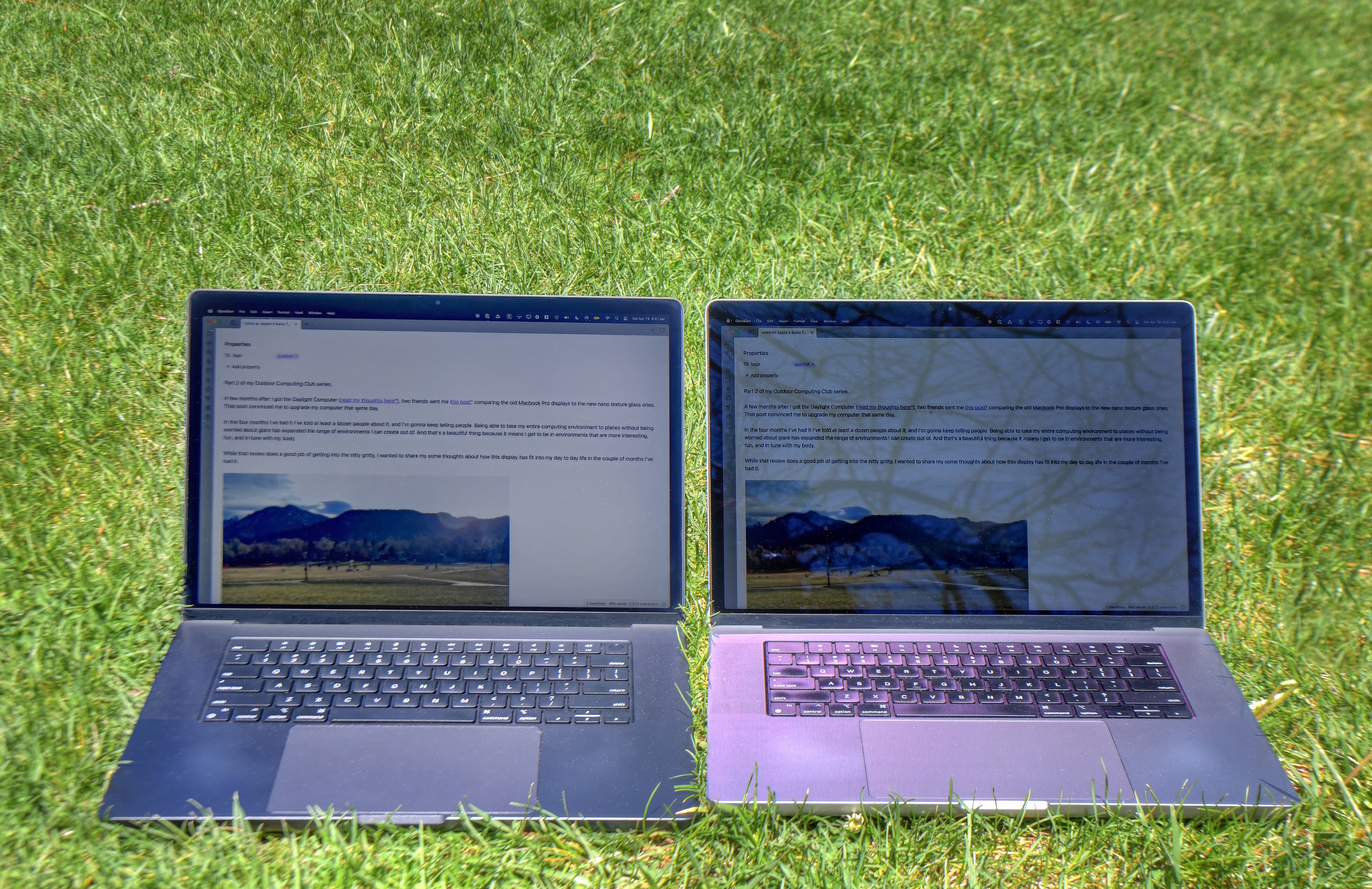

TLDR: the Nano Texture performs wonderfully anywhere where light used to be a factor and used to force me to shade my screen or avoid the place entirely.
- I’m less concerned with where I sit indoors. Coffee shops / offices with skylights or intense lighting are much more comfortable
- Coding and working outside is now feasible: browsing the internet, writing in Obsidian; all delightful
- The screen needs more effort to keep clean than a normal screen and comes with a special wipe that needs to be used instead of microfiber
- Black text on white background (light mode) is considerably more readable than white text on black background (dark mode)
- Overall a massive step forward for outdoor computing
Big thanks to Julie Kruger for the comparison photos and CJ for draft feedback.

A few months after I got the Daylight Computer (read my thoughts here), two friends sent me this post comparing the old Macbook Pro displays to the new Nano Texture glass ones. That post convinced me to upgrade my computer in short order, to the dismay of my wallet.
In the four months I’ve had it I’ve told at least a dozen people about it, and I’m gonna keep telling people. Being able to take my entire computing environment to places without being worried about glare has expanded the range of environments I can create in. It means I get to be in environments that are more interesting, fun, and in tune with my body.
What follows are some thoughts about how this display has fit into my day to day life in the couple of months I’ve had it.
Typical matt displays have a coating added to their surface that scatters light. However, these coatings lower contrast while producing unwanted haze and sparkle. Etched into the glass at the nanometre level, the nano-texture scatters light to further minimise glare — for outstanding image quality even in challenging lighting conditions.
https://www.apple.com/uk/shop/buy-mac/apple-studio-display/nano-texture-glass-tilt-adjustable-stand
Basically, it’s a coating physically etched into the screen that reflects light differently from the glossy finish of the traditional screen.

First off, this isn’t apples to oranges - these are different technologies that in my mind, serve a different purpose. The Daylight Computer is an Android tablet, the Macbook Pro is a full MacOS laptop.
The transflective LCD in the Daylight Computer is grayscale but it needs no light to function. It has a backlight, but where it does really well is in direct sunlight with the backlight turned off. When outside in direct sunlight, toggling the Daylight’s backlight on and off doesn’t make a difference because it works fundamentally different from a laptop screen.

On the Daylight computer:
- white text on black background has about the same readability as black text on white background
- the backlight can be lowered to 0% outside with no impact to visibility and making the battery last wonderfully long
- grayscale + lower DPI limits how much text can fit on the screen
- Daylight being a tablet form factor means I have to fiddle around with a configuration that will hold my screen in an ideal angle. It’s reasonably forgiving but certain angles are harder to see with than others

The Nano Texture MacBook Pro is still ultimately a traditional LCD screen. This means the only way to see the screen is if the backlight is powered on: having the backlight off in direct sunlights results in a black screen. Also, it’s worth noting:
- white text on black bg is a lot less readable than black text on white bg
- the backlight generally has to be at 90%+ to be comfortable
- retina display + wide swath of the color spectrum means most of what I can do indoors, I can do outdoors as well
- being a laptop with a hinge, it’s very easy to find the exact angle I want that minimizes glare & maximizes comfort
Both however are an incredible upgrade over outdoor computing options from just 1 year ago. I believe these are both massive steps in terms of ergonomics and freedom to be in more places as we compute.
- fingerprints, splatters, and smudges are mildly annoying indoors but almost fluorescent outdoors
- rubbing alcohol cleans them off when friction alone doesn’t do the trick but it still takes some rubbing. as far as I can tell, it’s not degrading the finish but I also try to clean it with the cloth before applying alcohol
- they give you one special screen cleaning cloth. I think the ideal number is like 5. Only this one can be used for Nano Texture screens.
- I read somewhere that this is because traditional microfiber cloths will shred into the screen, degrading visibility (but I can’t remember where so don’t quote me on on this)
- I’ve learned to bring my special wipe when I bring my laptop, and I slip a few rubbing alcohol wipes in there as well. I wet the Special Cloth with the alcohol wipes, and then apply the Special Cloth to the screen. This is definitely high maintenance
- I have to swat other people’s hands away when they try to point something out on my screen with their pizza fingers
- I’m more paranoid about swinging a USB C cable up against my screen or closing my laptop down on a grain of rice. I was less worried with my old screen
- The Nano Texture upgrade is an extra $150 on an already-expensive computer
- Closing the MacBook results in slight rubbing on the screen at the bottom of the keyboard / top of the trackpad, leaving scratches on the screen. So far this isn’t detrimental when the brightness is up; it’s only visible with the backlight off
- I don’t think this is a new thing because my old MacBook Pro (glossy screen) has scratches in the same exact place but I am worried about them being more visible on the Nano Texture screen in the long run
If you get annoyed by the glare of your screen and don’t mind a bit of extra mental bandwidth to keep your screen clean, I would highly recommend considering a Nano Texture display upgrade on your next laptop purchase. If you have a chaotic environment and can’t be bothered to keep your screen clean, or you aren’t bothered much by glare or reflections in the environments you work in, then the Nano Texture is probably not for you.