API development is a high-wire act. You’re constantly balancing new feature delivery against the terrifying possibility of breaking existing functionality. Testing, for example manually writing assertions for every field you expect back, is your safety harness. But what happens when the response payload is 500 lines of complex nested JSON? Your harness becomes a tangled mess of brittle code that takes longer to maintain than the feature itself. This is where snapshot testing shines, but it also has drawbacks of its own. Let's take a look.
What is snapshot testing?
Snapshot testing (sometimes called "Golden Master" testing) is straightforward:
- You take a system in a known, correct state.
- You capture its output (the "snapshot") and save it to a file. This is your baseline.
- In future tests, you run the system again and compare the new output against the saved baseline.
- If they match exactly, the test passes. If they differ by even a single character, the test fails, and you are presented with a "diff" highlighting the variance.
Unlike traditional unit tests that ask, "Is X equal to Y?", snapshot tests ask, "Has anything changed since last time?"
Why snapshot test HTTP APIs?
While snapshot testing is popular in UI frameworks (like React), it also works pretty well in the world of APIs. Be it HTTP, REST, gRPC or GraphQL, all types of APIs can be made to work with snapshot testing.
API responses, particularly large JSON or XML payloads, are notoriously difficult to test comprehensively using traditional assertions. Imagine an e-commerce API returning a product details object. It might contain nested categories, arrays of variant images, pricing structures, and localized metadata. Writing individual assertions for every one of those fields is tedious, error-prone, and results in massive test files that developers hate updating.
Often, developers end up just asserting the HTTP 200 OK status and maybe checking some fields of the top-level object, leaving 90% of the payload untested. This may result in embarassing bugs later on, even though the core business logic may be thoroughly tested.
A bug I often encountered is that data that is being exposed via an API that should not be exposed, but nobody notices during development or review. Imagine a user object with a password field (hashed of course), which obviously should not be exposed. A bug is introduced, exposing this field publicly via the API. Since no test exists that this field should NOT be exposed, the change passes the PR review and is merged.
Uh-oh, someone made a mistake
{
  "id": 1,
  "username": "johndoe",
+ "password": "$2a$12$QuJLR1Ot8AB0uWtKOMC9hOpU1g9bLkYant5g5I6CdC4HsQCvyN9zG",
  "email": "[email protected]",
  "profile": {
    "department": "Engineering",
    "theme": "dark"
  }
}
Snapshot testing solves this by treating the entire response body (and sometimes including headers and status) as the unit of verification. It provides immediate, comprehensive coverage against unintended side effects. If a backend developer accidentally changes a float to a string in a nested object three levels down, a snapshot test will catch it instantly.
Benefits: Speed and confidence
Adopting snapshot testing for your APIs offers significant advantages.
Fast test creation
Snapshot tests are easy and fast to create. This often leads to more tests being created than with traditional tests, as less time must be spent per test created.
Catching everything
Traditional tests only check what you think might break. Snapshot tests catch everything that does break. It protects you from side effects in areas of the response you might have forgotten existed. Accidentally removing a field provides instant feedback instead of only catching the bug in production.
Accidentally serialized the enum as number instead of string
{
  "id": 1,
  "username": "johndoe",
  "email": "[email protected]",
  "profile": {
    "department": "Engineering",
-   "theme": "dark"
+   "theme": 1
  }
}
Quick updating of tests
Changing or introducing a field means you have to update all your tests or snapshots in our case. While this may seem like a drawback at first, this process is usually pretty fast with the correct tool. Simply run all tests, which should fail since something has changed. Then, review the diffs and accept them all. With traditional testing, if you wanted to keep the same coverage, you would have to change or add an assertion to each affected test case. This often proves difficult in practice, as either developers are too lazy to or spend a long time to do this.
Simplified code reviews
When a snapshot test fails due to an intentional change, the developer updates the snapshot file. In the pull request, the reviewer sees a clear, readable diff of exactly how the API contract is changing.
Pitfalls: Dynamic data and missing discipline
Snapshot testing is powerful, but it has sharp edges. If misused, it can lead to a test suite that developers ignore.
The nondeterminism problem
This is the number one enemy of snapshot testing. APIs often return data that changes on every request:
- Timestamps ("createdAt": "2023-10-27T10:00:00Z")
- Generated UUIDs or IDs
- Randomized ordering of arrays
If you include these in your raw snapshot, your test will fail on every run. Dynamic data must be remove or replaced by the snapshotting tool before comparing snapshots. Luckily, most snapshotting tools can be configured to remove things like dates and UUIDs altogether or replace them with deterministic placeholders. Other configuration options allow to ignore specific properties or matching content with regexes.
A snapshot with scrubbed timestamps, meaning the got replaced with placeholders
{
  "id": 1,
  "username": "johndoe",
  "email": "[email protected]",
  "creationDate": "{timestamp_1}",
  "profile": {
    "department": "Engineering",
    "theme": "dark"
  },
  "lastLogin": "{timestamp_2}"
}
APIs returning randomly ordered arrays is often a actually a bug that developers have not considered, probably due to returning data directly
from the database without an explicit ORDER BY clause.
So it may actually be a good thing that randomly ordered arrays do not work with snapshot testing!
Otherwise, API consumers are forced to order the data themselves before presenting them to users (since data would randomly re-order on each reload).
Snapshot fatigue
When snapshots fail frequently (perhaps due to the nondeterminism mentioned above), developers can get fatigued. They stop analyzing the diff and just blindly press the "Update Snapshot" button to get the build green. At this point, the tests are useless. Discipline is required to ensure failures are investigated.
Snapshot tests only catch that something has changed. It is on the developers and reviewers to determine whether the change was intended.
A similar thing can happen when reviewing a PR with many snapshot updates all over the place. It may be difficult for the reviewer to grasp whether all snapshot changes where truly intended. Keep your PRs small and focused on one change at a time. Reviewing snapshots where in each one the same field was added makes things much easier.
Practical snapshot testing example
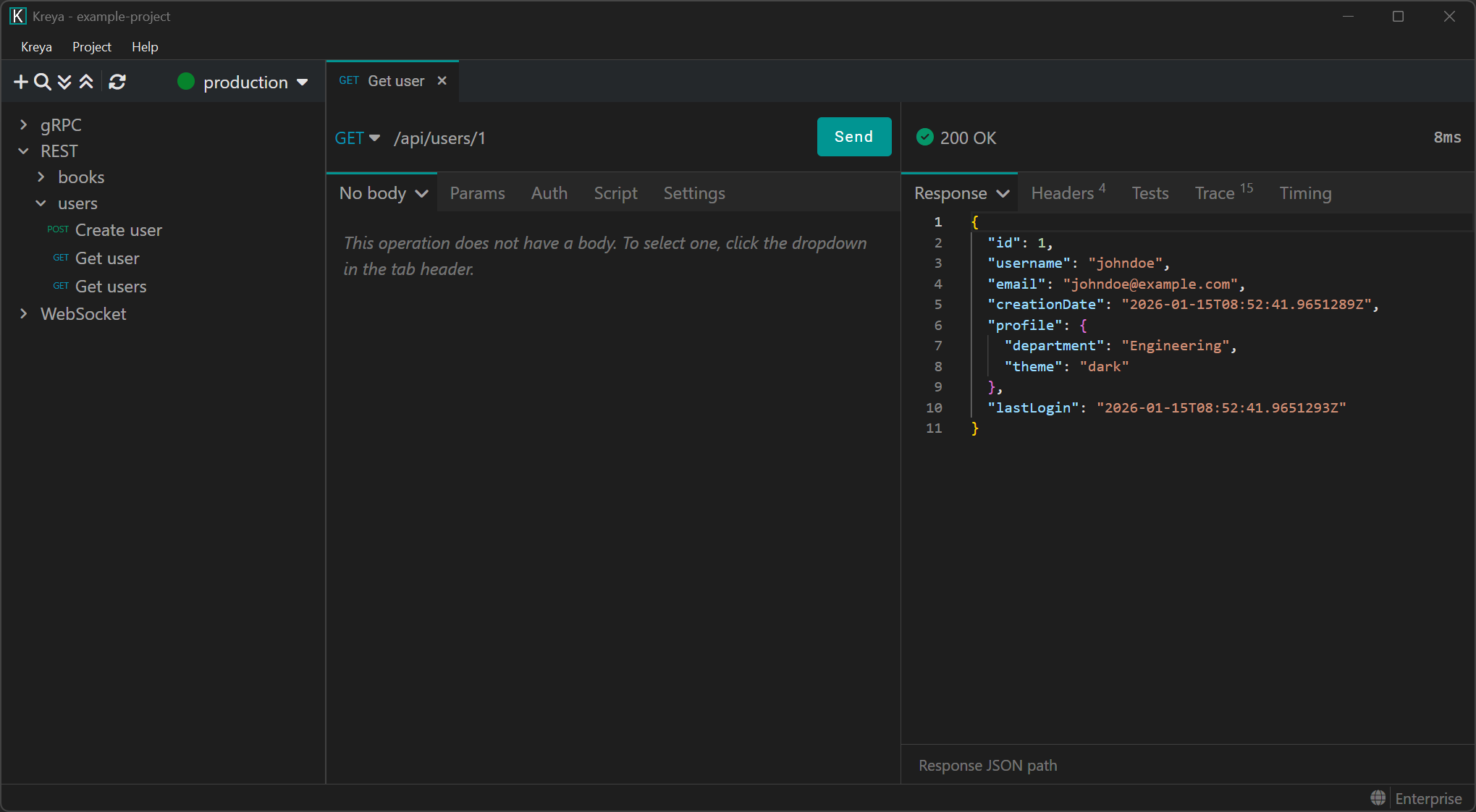
Let's walk through a practical example of snapshot testing. Since this is our blog, we use Kreya as the snapshotting tool. Kreya allows you to call REST, gRPC and WebSocket APIs (with GraphQL coming soon in version 1.19). Snapshot testing works for all of them.
Step 1: The setup
Imagine you have a REST endpoint GET /api/users/{id}.
You create a request for this endpoint or let Kreya generate one automatically by importing an OpenAPI definition.

Step 2: Enable snapshot testing
The request works. Now, you need to enabling snapshot testing in the Settings tab. Then, call the endpoint once to generate our baseline. Accepting the snapshot stores the baseline as a text file on the disk.

Did you spot that Kreya automatically scrubbed the timestamps of the response? This ensures that the snapshot does not store any dynamically generated data.
Step 3: Check if everything works
The snapshot is stored on disk and will be checked against the new response when we call the endpoint again. Let's do this once to see if everything works correctly.

As we can see, the snapshot matches exactly. The snapshot test turns green.
Step 4: Testing a regression and the diff
A week later, someone on the backend team accidentally renames the profile.department field to just profile.dept. You run your Kreya tests. The test fails. Kreya presents a clear diff view:

You instantly see the breaking change. If this was intentional, you press "Accept" button in Kreya, and the new structure becomes the baseline. If it was accidental, you have caught a bug before it reached production.
Other protocols
Snapshot testing also works for other protocols, for example gRPC:

Conclusion
Snapshot testing is not a silver bullet, it doesn't replace all unit or integration tests. However, for HTTP APIs with complex payloads, it is perhaps the highest-ROI testing strategy available. It trades the tedium of writing endless assertions for a system of rapid baseline comparisons.
Tools like Kreya make this process manageable by integrating snapshotting directly into the development workflow and providing robust mechanisms to tame dynamic data. By incorporating snapshot tests, you gain a safety net that allows you to refactor and add features to your API with significantly higher confidence.