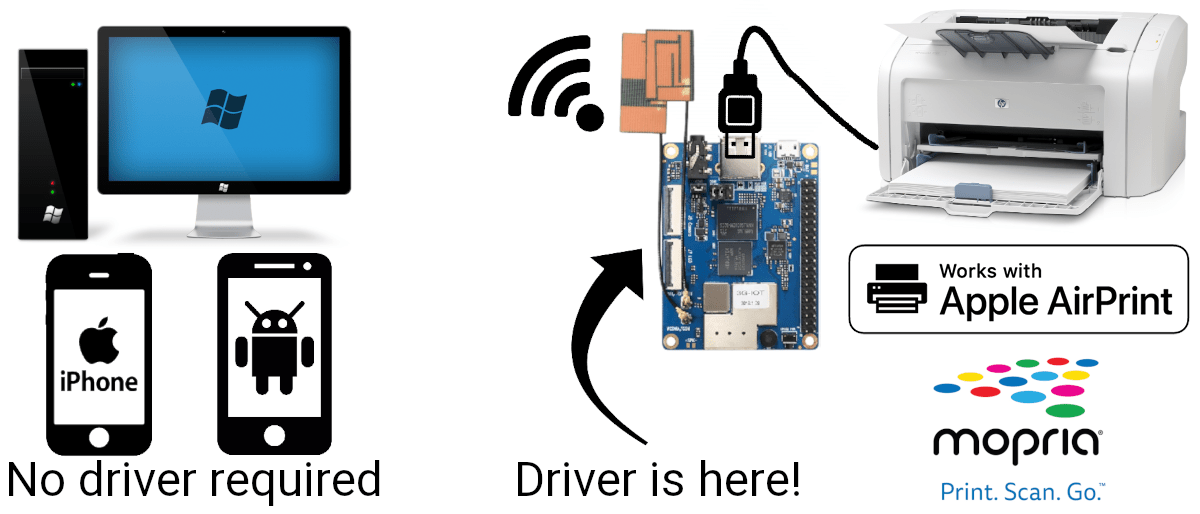
UoWPrint is a modern print server created to bring wireless capabilities to older printers, scanners, and all-in-one devices.
It is designed as an easy-to-use add-on appliance and allows you to:
- Convert your old USB printer (or MFP) into Wi-Fi printer/MFP
- Print and scan without drivers from Windows/macOS/Linux, as well as iOS/Android
Contrary to older-generation print server hardware or home routers
with printer-sharing functions, UoWPrint does not require to install any
printer-specific drivers or applications on your devices but uses
universal standard drivers available in any contemporary operating
system.
The printer driver is running on the print server itself, freeing you
from installing drivers on the PC.
In other words, with UoWPrint you can use AirPrint and Mopria to print and scan over the network on your USB printer.
✅ Compatible with Windows, macOS, Linux, Android, iOS
✅ Compatible with MacBook M1/M2/M3/M4 (ARM)
✅ Compatible with Windows on ARM (Qualcomm Snapdragon)


Printer compatibility
UoWPrint is best compatible with older-generation consumer devices
(manufactured before the year 2018) and supports a very wide range of
ink and laser printers and scanners. However, some of the printers are
not supported well or at all.
HP devices work very well, Samsung and Xerox support is also pretty
reliable, while Canon compatibility depends on the device generation and
may be not as fast or reliable.
Check almost full list of supported devices.
Included drivers
The following non-exhaustive list provides a brief overview of the available drivers and popular supported models:
- splix
and foo2qpdl
for Samsung Printer Language (SPL) devices:
- Samsung SCX-3200, SCX-4200, SCX-4300
- Samsung ML-1210, ML-1710, ML-2015, ML-2525, ML-2165, ML-3471
- Samsung CLP-500
- Xerox Phaser 31xx/34xx, 5500, 61x0, WorkCentre 3119
- foo2zjs,
foo2xqx,
hpcups for the
majority of HP LaserJets, InkJets, DeskJets, and PhotoSmarts:
- HP LaserJet 1005, 1010, 1018, 1020, 1160, 1320, 3020, 3030, 3330
- HP LaserJet P1005, P2015
- HP LaserJet Pro P1102, P1566, P1606dn
- HP LaserJet M1522nf, 3055
- HP LaserJet Pro MFP M521, MFP M425
- capt
open-source driver for Canon Advanced Printing Technology (CAPT) devices
alpha-quality drivers:
- Canon i-SENSYS LBP2900, LBP3000, LBP3010, LBP3100, LBP6000
- Official Canon CAPT
driver running in x86 emulation mode:
- Canon Laser Shot LBP810, LBP1120
- Canon Laser Shot LBP5100, LBP6000B, LBP7018C
- carps
for Canon Advanced Raster Printing System (CARPS) devices:
- Canon MF3110, MF56x0, MF57x0
- Canon MF3200
- Canon LC310, L390, L408S, L180, L380S, L398S
- Canon PC-D300, FAX-L400, ICD300
- Canon UFRII-based
devices running in x86 emulation mode:
- Canon LBP212dw, LBP214dw
- Canon LBP3360, LBP3460, LBP6230dw, LBP6650dn, LBP6780x, LBP7660cdn
- Canon MF212w, MF4010, MF4018, MF4320d, MF512x
- brlaser
for Brother laser devices:
- Brother HL-1110, HL-120x, HL-L237x, HL-L5000D
- Brother DCP-1623
- rastertokpsl-re
for Kyocera GDI devices:
- Kyocera FS-1020MFP, FS-1025MFP, FS-1040, FS-1060DN, FS-1120MFP, FS-1125MFP
- Panasonic
GDI official printers running in x86 emulation mode:
- Panasonic KX-MB1500, KX-MB2000, KX-MB2500 series
- Panasonic DP-MC210, DP-MB250 series
- Pantum printers and MFPs
official driver running in x86 emulation mode:
- Pantum BM5100, M6500 series
- Pantum P2200, P2500 series
- Epson
Inkjet Printer Driver and Driver
2:
- Overwhelming majority of Epson devices
- GutenPrint:
- Canon PIXMA/imageRunner, Kyocera, Lanier, Ricoh, Xerox and other devices
- GhostScript:
- Various PostScript, PCL, IJS models
… and many others.
Operating system support
- Windows XP/7/8/8.1, with limited printing options support (PostScript / PCL)
- Windows 10, October 2018 update (build 1809) and newer with full support (Mopria)
- Windows 11 (Mopria)
- macOS 10.6+ (AirPrint / AirScan)
- Linux with CUPS 2.2.2+ (AirPrint / Mopria)
- Android 8+ (default print service) or Android 4.4+ with Mopria Print Service + Mopria Scan
- iOS 4.2+ (AirPrint, no built-in scanning support, scanning using web interface possible)
Device-specific driver is not required on every OS.
Project information
Why?
After buying used old USB-only printer, I was looking for a modern
retail print server which would allow me to use the printer as you use
the newer ones, over Wi-Fi and without drivers, but could not find
anything on the market!
Reducing e-waste, improving convenience, and re-using single-board
computers for good is the main motivation of this project.
Old printers are tend to be better than the new ones: the best mono lasers were manufactured in the year 2004-2010, that was the peak of reliable, serviceable, and cheaper to operate machines than the current retail models. They do not offer subscription service or annoying firmware updates which block third-party toner cartridges.
No anti-consumer practices
No Internet connection required. The device does not
use the Internet for anything besides time synchronization. No
telemetry, no automatic updates.
Secure by default. Network firewall blocks all
connections from the outside of your network. No hard-coded passwords.
IPv6 support.
Open for enthusiasts and modification. Comes with
source code and full build system of the firmware.
Reliable technical support. We sold you the print
server and it doesn’t work as intended? We’ll buy the same printer model
and debug the issue until it’s fixed!
Software
UoWPrint is based on well-known Linux-world open source software:
- CUPS print server with AirPrint/Mopria shading capabilities
- SANE scanning suite for MFP and dedicated scanner support
- AirSane for AirScan/Mopria scanner sharing capability
- box86 emulator to use official (proprietary) printer and scanner drivers for x86 machines on ARM architecture, which enables wide compability in the absence of an open driver.
All you need to start printing is plug the printer into the USB port and add it using print server web interface. The printer will be discovered on all devices on the network automatically.
The device works as Wi-Fi access point or connects to your Wi-Fi network as a client, Ethernet connection is also available. It incorporates simple web interface to configure Wi-Fi connection and printer, and scanners usually do not require special configuration and work out-of-the-box.
The operating system of the device is based on Debian 12 and has been optimized for memory constraints and fail-save appliance-like operation: power off the device by unplugging the power without worrying of data corruption, revert to factory defaults with a click of a button.
Warning: this project may not be suitable for professional printing. Due to the various quality of the drivers, the printouts may not present accurate colors or the highest quality. Some printer and scanner drivers have bugs and don’t work reliably. UoWPrint has undergone thoroughful, but limited testing. We constantly find and fix bugs in the whole printing and scanning stack (and contribute back to related projects to ensure bug-free experience for everyone), but this is best-effort low-scale holiday project, some thigs are way over our heads. Ask to check your printer support in advance by email.
Hardware
UoWPrint v2 is based on OrangePi Zero 3 single-board computer. Key specifications:
| Size |
62 mm × 56 mm in acrylic case 55 mm × 50 mm the board itself |
|---|---|
| Weight | 52 g |
| CPU |
Allwinner H618 ARMv8 Cortex-A53 Quad Core, 1.5 GHz |
| RAM | 1 GiB LPDDR4 |
| Flash memory | 512 MB MicroSD card |
| USB |
1× USB 2.0 Type-A Host for printer connection 1× USB 2.0 Type-C OTG for 5V power supply and PC connection LPT printer connection possible with USB-LPT adapter cable |
| Wi-Fi | 802.11ac 2.4+5 GHz, Wi-Fi hotspot and client modes |
| Ethernet | 1G/100M Built-in Ethernet |
| Supported standards |
Driverless printing and scanning:
|
| Features |
No internet connection required No account or subscription required No automatic updates Web-based configuration, no additional software required Comes with the source code, firmware, and free technical support |
| Operating system |
Based on Debian 12 Linux kernel 6.6 |
| Software |
OpenPrinting CUPS SANE AirSane Box86 |
Order
What you get:
- UoWPrint v2 device (without USB power supply or cable)
- Electronic instruction
- Archive with the firmware, source code, and build scripts
- Free tech support from the living human being who takes responsibility for fixing possible compatibility issues with your printer
All you need is a USB-C cable and a power supply (any cellphone charger).
Price: $35 USD or 2900₽ (Russian Ruble), shipping cost not
included.
Payments using cryptocurrency (preferred), PayPal, or Russian SBP.
Order by email: [email protected]
For each sold device, CUPS and SANE developers receive $2 donation each. The profit of selling the device is to be spent on improving open source drivers support.